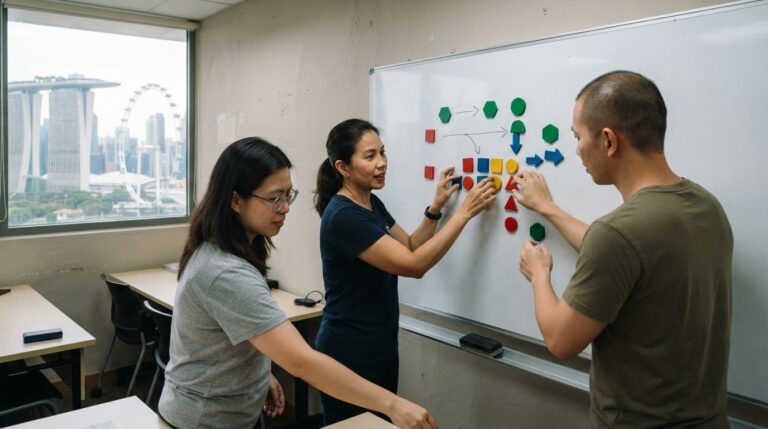
AI creates value when it takes repetitive, information-heavy steps off people’s hands, leaving colleagues to focus on decisions, relationships and exceptions. The time saved depends on the task and the human review it still needs. Learning how to explain the value of AI to non-technical colleagues starts with showing what changes in their working day, not with technical terms.
It’s reasonable to ask whether AI will genuinely save time or simply add another tool to manage. A practical way to explain its value is to compare a task before and after AI, including the time needed to review and correct the output.
This article looks at how AI can support marketing, HR, and customer service, and how to describe those uses in familiar workplace language. You’ll learn to explain what AI can do, where human judgement remains essential, and how to discuss possible time savings without overstating them.
Key Takeaways
- Explain AI through familiar workplace tasks and the specific problem it can help solve.
- Connect examples from marketing, HR and customer service to outcomes colleagues care about.
- Show how data and human judgement work together to shape useful, trustworthy results.
- Assess potential time savings by comparing a task’s workflow before and after AI support.
- Build practical AI understanding by focusing on everyday applications rather than technical jargon.
1. Communicating AI’s value through workplace communication skills
AI learning is most useful when it helps people explain a real workplace challenge. In a course discussion, ask learners to describe a task in plain language, say who handles it, and identify what makes it difficult. For example, an HR coordinator might find it challenging to organise applications consistently. This exercise builds communication skills alongside a practical understanding of artificial intelligence, without relying on technical terms.
Traditional software follows rules people set; AI systems learn patterns from examples to produce outputs. Automation means a process performs steps with less manual effort, using either traditional software or AI. In an AI course, learners can compare a fixed rule that routes applications containing a keyword with a model that groups applications by broader patterns. This makes the different capabilities easier to understand.
Use a simple sequence to identify a useful AI learning case: name the task, find the repeated or information-heavy step, describe the desired improvement, and decide where a person must review the result. A learner could apply this to organising staff feedback. The exercise connects course concepts to work and helps colleagues discuss a potential use without promising results in advance.
Explaining a use case also means adapting the message to the audience. A team leader may care about consistent processes, while an employee may want to know how daily responsibilities could change. In a training exercise, learners can present the same example to both groups, focusing on each audience’s priorities. This practice helps them create clearer prompts and explain why context matters to an AI tool.
Course discussions should make room for employees affected by new workflows. Manufacturing, retail, customer service, and administrative roles may face changes after decades of relatively stable routines. Workers aged 50 years and older may find new AI-powered workflows overwhelming. A learning activity can invite participants to map which tasks might change, what support would help, and where their experience should shape implementation.
Creative thinking helps learners move beyond familiar examples. Ask them to consider a routine handover, a recurring customer question, or a delayed internal request, then suggest where AI might support one step. The group can discuss what the tool should produce and what employees would still decide. This makes AI learning collaborative and grounded in practical work.
People exploring AI courses for beginners can look for instruction that connects foundational ideas with workplace communication practice. Learners comparing SkillsFuture AI courses should distinguish course content from funding questions, and assess whether the learning addresses their goals. Likewise, a 1 day AI course in Singapore may suit someone seeking a focused introduction, while workplace application still requires continued practice. The central lesson is simple: explain the task, the potential support, and the human role.
2. Data, algorithms, computing power and human expertise
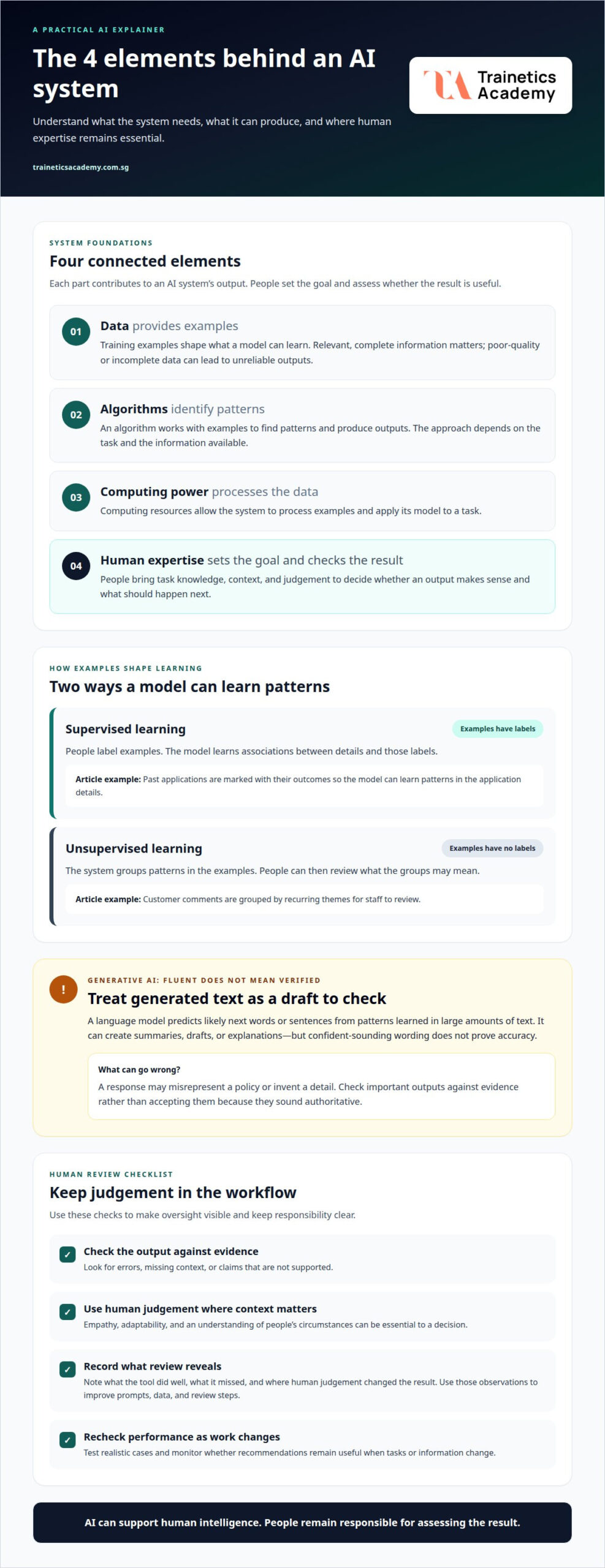
Explain an AI system through four connected elements: data, algorithms, computing power, and human expertise. Data provides examples; an algorithm identifies patterns; computing power processes them; people set the goal and assess the result. For instance, a team analysing past loan applications needs relevant records, a model designed to identify patterns, sufficient computing resources, and staff who understand lending decisions.
Training data shapes what a model can learn. In supervised learning, people label examples, such as past applications marked approved or declined. The model learns associations between the application details and labels. In unsupervised learning, examples have no labels, so the system groups patterns on its own. For instance, it might group customer comments by recurring themes for staff to review.
Generative AI is not a fixed answer database. When someone enters a prompt, a language model predicts likely next words or sentences based on patterns learned from large amounts of text. It can produce fluent summaries, drafts, or explanations, but fluent wording does not prove accuracy. A response may sound authoritative while misrepresenting a policy or inventing a detail.
Keep human judgement in the workflow wherever decisions require empathy, context, or adaptability. A hiring tool might organise application information, but a recruiter should assess a candidate’s circumstances and suitability. A customer service assistant can suggest a response, while an employee considers the customer’s tone and unresolved concern. Oversight means checking outputs against evidence, not accepting them because they sound confident.
AI has limits. A model may struggle with a new problem when it lacks relevant examples, or miss context that employees understand through experience. Poor-quality or incomplete training data can produce unreliable outputs. Test a system on realistic cases, check where errors occur, and monitor whether its recommendations remain useful as tasks or information change.
People bring complementary skills that strengthen AI-assisted work. Analytical thinking helps staff spot patterns and check whether conclusions follow from evidence. Creativity helps them consider alternative questions or uses for an output. Communication helps them explain findings clearly, while professional judgement identifies when a decision needs a person’s attention. For example, an analyst can use AI to organise survey comments, then interpret the themes in light of customer needs.
Use a simple review routine: note what the tool did well, identify what it missed, and record where human judgement changed the result. This makes limitations visible and helps teams improve prompts, data, and review steps. It also keeps responsibility clear: AI can support human intelligence, but employees remain essential for evaluating its outputs and deciding what to do.
3. AI use cases in marketing, HR, administration, and customer service
Marketing teams can use artificial intelligence to turn a campaign brief into draft copy, audience variations, or a content outline. For example, a marketer can provide a product description and request email subject lines for different customer groups. The team then checks accuracy, tone, and fit with campaign goals. The value is straightforward to explain: AI helps produce a first draft, while marketers guide the message.
In HR, AI can help structure job descriptions, summarise policy documents, or prepare interview questions based on role requirements. A recruiter might ask it to draft questions that assess a role’s stated skills, then check each question for relevance and fairness. The benefit is a faster starting point, not an automated hiring decision. Explain the workflow by showing which preparation steps AI supports and where the HR professional applies judgement.
Administration teams often handle meeting notes, action items, and follow-up messages. AI transcription can reduce post-meeting documentation time to under 10 minutes in most cases. A team can use a transcript to draft a summary, then check names, decisions, and assigned actions against the meeting. This example translates AI’s value into a familiar outcome: less time reconstructing a discussion and more time completing the agreed work.
Customer service teams can use AI to analyse recurring feedback. For example, grouping 500 customer reviews by topic can reveal the three most-mentioned problems. Staff can then examine the underlying comments, distinguish urgent issues from general suggestions, and share clear themes with the relevant team. The practical value is not simply a quicker summary. It is a more organised starting point for deciding which customer concerns deserve attention.
These examples also help teams set boundaries. A marketing draft needs brand review; an HR question needs role context; a meeting summary needs factual checks; and review themes need interpretation. For each workflow, identify the input, the AI-generated output, and the employee’s review step. This simple map shows what changes in daily work without suggesting that AI replaces the people responsible for quality.
Choose examples colleagues recognise, and describe the task before the tool. A marketer may care about campaign preparation, while an administrator focuses on meeting follow-up. Invite each team to test a small workflow and record what needed correction. This can show whether the use case suits the work, what guidance employees need, and where human review should remain.
4. Explaining applied AI for non-technical professionals
Start with an everyday comparison: AI is an assistant that can draft or organise information, while an employee sets the purpose and reviews the work. Generative AI can create text, images, and code based on patterns in existing data. For a colleague who prepares reports, describe it as a tool for producing a first draft, not replacing expertise or accountability.
Use one familiar task to make the capability tangible. A well-written prompt can help summarise a 20-page report in under 10 minutes, compared with 45 minutes. The colleague can then spend more time checking key findings and preparing a decision-ready summary. Explain the input, the output, and the review step, so the example shows a real workflow rather than an abstract promise.
Workplace evidence can make the case more concrete. A Salesforce report states that 68% of knowledge workers say AI helps them complete repetitive tasks faster, regardless of technical background. For a non-technical team, connect this finding to tasks such as drafting routine updates or sorting information. The point is not that every task changes equally, but that practical use can extend beyond technical roles.
Time savings are also relevant to writing and synthesis. The McKinsey Global Institute estimates that generative AI can help knowledge workers recover between 20% and 40% of time spent on those tasks. Translate that estimate carefully: AI may support summarising, drafting, and combining information, while staff still verify facts and shape the final work. The estimate describes potential, not a guaranteed result for every team.
Plain language builds understanding more effectively than explanations centred on algorithms. Instead of describing model architecture, show a sample prompt and response. For example, ask an AI tool to turn meeting notes into a short action summary. Then point out where it missed a decision or assigned an action incorrectly. The demonstration shows both capability and limitation in a familiar context.
Trust also depends on explaining what happens to information. Colleagues may hesitate if they don’t know how a tool uses their data or why it produced an answer. Start with non-sensitive material and show how employees can review outputs for errors, bias, or unsupported claims. Make the review process visible rather than presenting fluent output as proof of accuracy.
Effective AI learning for non-technical professionals focuses on core concepts and practical applications, not coding. A marketing coordinator can practise refining a campaign draft; an administrator can test a meeting summary. In each case, ask what the tool handled well, what needed correction, and which human decision mattered. This reflection connects artificial intelligence to professional skills employees already use.
5. How to measure the ROI and value of workplace AI projects?
Start with a baseline: record how long a task takes before introducing AI. Then measure the same task after adoption, including the time employees spend reviewing and correcting outputs. For example, compare the full process of drafting a routine report, not just the minutes an AI tool takes to produce a first draft. This shows whether the workflow improves in practice.
Time is only one measure. Track whether AI changes output quality, completion rates, rework, or the number of tasks employees can handle. A customer service team might measure how quickly it groups feedback, then check whether staff can identify recurring issues more clearly. Choose indicators that match the problem the project was meant to address.
Account for the work around the tool. Employees may need time to learn a new workflow, check outputs, correct errors, and refine prompts. A meeting summary, for example, may reduce transcription effort but still need someone to confirm decisions and action owners. Include review steps in the comparison so the result reflects the whole task, not just one automated stage.
Assess value alongside the resources needed to operate the system. Consider the effort involved in preparing data, training users, maintaining the workflow, and managing human oversight. ROI compares the value created with the resources invested. A clear assessment weighs time or quality gains against the ongoing work required, rather than treating faster output alone as proof of business value.
Use a controlled comparison where practical. Choose a repeatable task, document the current process, and run the AI-assisted version on comparable work. Record what changed, where employees intervened, and what needed correction. If results vary, consider whether the input material, task complexity, or review process differed. This helps colleagues understand the outcome and guides improvements before the workflow expands.
For an office team in Singapore, a practical pilot could examine how AI supports recurring internal updates. Compare the existing workflow with the AI-assisted one, including staff review and edits. Share the baseline, results, and limitations in plain language. This gives colleagues evidence from their own work rather than relying on examples from another organisation.
Build the skills to assess AI applications and workplace value through practical artificial intelligence learning.
Trainetics Academy
Trainetics Academy offers an Artificial Intelligence Course for professionals who want to build practical AI knowledge. Structured learning can help you move beyond isolated tool demonstrations to understand how AI may support workplace tasks, where human review matters, and how to explain its value to colleagues. This foundation can help you assess potential applications in marketing, HR, administration, and customer service. To develop your AI knowledge, contact Trainetics Academy to learn more about the course.
Turn AI understanding into your next professional skill
AI conversations become more productive when teams replace abstract claims with clear, shared expectations. Make learning part of professional development: build enough understanding to ask sharper questions, recognise where a tool may fit, and contribute confidently to decisions about its use. Explaining AI’s value to non-technical colleagues is not a one-time presentation; it’s a skill strengthened through practice, reflection, and informed discussion.
As your knowledge develops, you can help colleagues evaluate AI ideas more clearly and discuss practical opportunities without overstating them. Trainetics Academy offers an Artificial Intelligence Course for learners who want to build this foundation and apply it in workplace contexts. Consider which responsibilities you want to handle with greater confidence, then use structured learning to develop those capabilities.
Start a conversation with Trainetics Academy about your next step in AI learning. Build your understanding with purpose and help shape more thoughtful conversations about AI at work.
Frequently Asked Questions
How much time can you save by automating tasks with AI?
There is no single time-saving figure that applies to every AI task. Savings depend on how repetitive the work is, how often exceptions arise, and how much output checking it needs. A process with consistent inputs may require less manual handling than one involving individual decisions. Include setup and review effort too, as these affect the net time employees gain.
What is generative AI?
Generative AI is a type of AI that produces new content in response to instructions. For example, someone could ask it to suggest alternative wording for an internal announcement based on provided notes. It generates a response from patterns learned during training; it does not necessarily retrieve an exact passage from a trusted source. This distinction helps explain why generated content needs a clear purpose and context.
How to explain AI in simple terms to non-technical colleagues?
Compare a language model to a more capable form of autocomplete: it uses the words and instructions it receives to generate a likely continuation. For example, show how it completes a short, low-risk draft, then explain that a plausible response is not the same as understanding a colleague’s intent. This analogy makes the idea accessible while clarifying the tool’s limits.
What practical business problems can AI solve?
AI can help teams spot administrative irregularities, such as possible duplicate entries in expense records, for staff to investigate. It may also help organise resource requests or identify patterns in operational data. These uses work best when employees have a clear next step for reviewing the results. AI can flag or organise information, while the relevant team decides what action to take.
What are examples of AI saving time or reducing costs at work?
An accounts team might use AI to organise expense receipts, identify missing fields, and prepare entries for review. This may reduce some manual sorting, while employees remain responsible for checking records. Any effect on costs depends on how the organisation uses the time freed up and whether the process needs additional review or correction. Treat these as possibilities to assess, not guaranteed savings.
How should employees explain AI accuracy, errors, and human oversight?
Explain accuracy by showing how results are checked against authoritative information, such as an internal policy or source record. Teams can group errors by type, including missing details, incorrect facts, or unsuitable recommendations, then decide which cases need escalation. This gives colleagues a clear picture of how errors are managed. Outputs should not be treated as the final authority for consequential decisions.
Disclaimer
AI Content Disclaimer: Some articles on this website may be generated or assisted by AI-powered content creation tools. While we strive for accuracy and relevance, readers should independently verify information before relying on it. The content is provided for informational purposes only and does not constitute professional advice.