86% of workers in Singapore reported using AI at work in 2026, up from 78% in 2025, according to CNA’s report on IMDA data. Yet more tools don’t automatically mean better results. The Best AI Tools in 2026 are the ones that fit your work, not simply the ones everyone is talking about.
If you’re comparing fast-changing features, checking accuracy or deciding whether a tool is suitable for workplace data, start with the task you need to do. The right choice depends on how well the tool fits your workflow and how easily you can review its output.
This guide compares AI tools by practical use, explains their trade-offs and offers a straightforward way to test them before adding another app to your toolkit. You’ll also find guidance on reviewing outputs and using AI responsibly at work. For professionals who want to build these skills, Trainetics Academy delivers interactive AI courses in physical and virtual formats.
Key Takeaways
- Choose tools for a defined work task, not because a brand is popular, and keep your toolkit focused.
- Use the Best AI Tools in 2026 comparison to shortlist general-purpose assistants and specialist tools for your workflow.
- Assess accuracy, privacy, integration and review effort before relying on an AI tool for professional work.
- Test one recurring, low-risk task, check the result against your usual work standards and refine the process.
- Practise prompting and output evaluation so familiarity with a tool develops into practical workplace judgement.
Best AI Tools in 2026: Start With the Work You Need to Do
A popular AI tool isn’t automatically the right choice for your next report, client email or research task. Judge the Best AI Tools in 2026 by how well they support a specific piece of work and how confidently you can check the result.
This guide focuses on professional generative AI tools that create or transform text, images, code and other content. It doesn’t cover every form of artificial intelligence, such as robotics or predictive analysis. For broader context, explore What is Artificial Intelligence? Whatever tool you use, results depend on the task, the quality of your instructions and source material, and human review.
For a quick overview of tools aimed at professionals, watch this introduction:
Which work tasks can AI tools support?
Begin with the work you need to complete, then decide whether AI can assist at one or more stages. The person using the tool remains responsible for decisions, accuracy and final approval.
- Writing: Draft or refine emails, reports and briefs. Check that the final version reflects your facts and intended tone.
- Research: Organise sources and summarise material for review. Confirm important points against the original sources.
- Meetings: Prepare an agenda or structure notes and action items. Verify owners and follow-ups against your notes.
- Visual creation: Develop concepts for presentations or campaign assets, then check the details against the brief.
- Coding: Explain code, suggest a draft or help investigate an error. Test suggestions before using them.
- Workflow support: Organise recurring steps, updates or task handovers, while keeping a person responsible for reviewing the result.
These are possible starting points, not promises of time saved or error-free work. A summary still needs checking against its sources; a draft message still needs a person to confirm its tone, facts and suitability for the recipient.
What does “best” mean for a professional?
A useful tool produces work you can assess, makes its output straightforward to review and fits the systems and processes you already use. A general-purpose assistant may support several types of task, while a specialist tool may focus on one, such as meeting transcription or visual design. Neither is automatically superior. Your choice depends on the job and how you’ll verify the output.
Test a tool on a real, low-risk task. Give it clear instructions and relevant context, then check whether its response is useful, complete and easy to correct. Note whether it adds steps, disrupts your workflow or creates so much review work that its value is reduced. This gives you a more useful comparison than judging a tool by a polished demonstration.
Capabilities, integrations and access options can change during 2026, so treat any comparison as a snapshot rather than a permanent ranking. Build sound selection and review habits alongside tool familiarity. Trainetics Academy’s Artificial Intelligence Course supports professional AI learning and practical judgement in selecting, prompting and reviewing tools at work.
Best AI Tools in 2026 by Category: Match the Tool to the Task
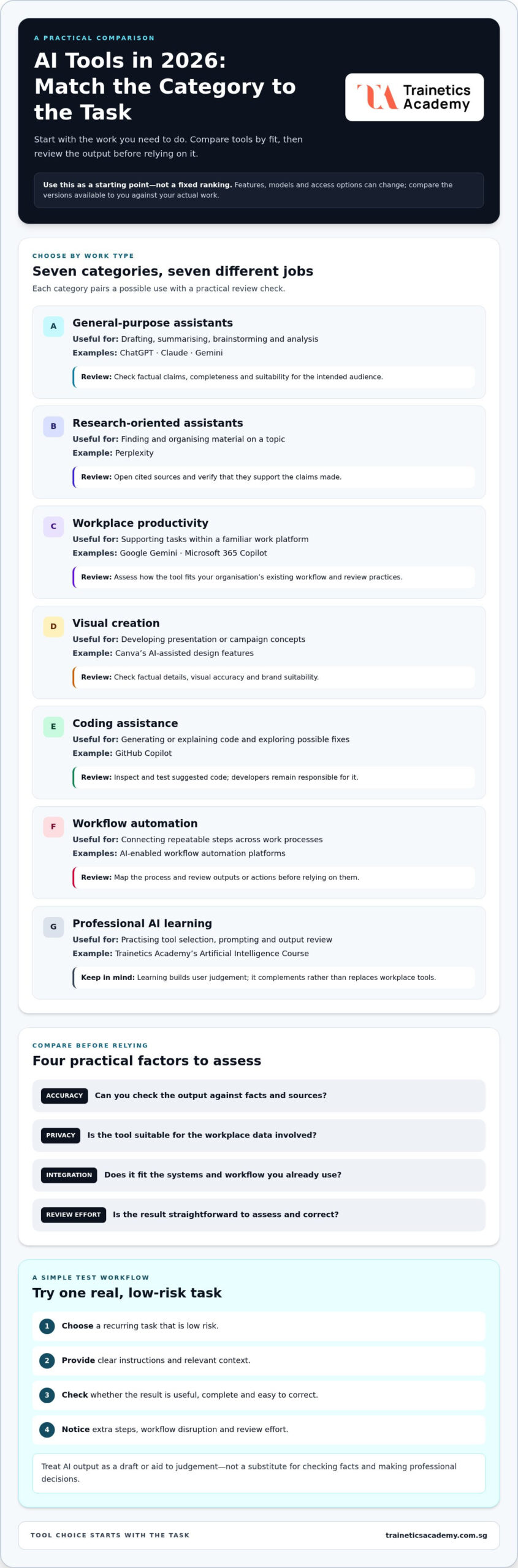
Use this comparison as a starting point, not a fixed ranking. ChatGPT, Claude and Gemini are general-purpose assistants that can support tasks such as drafting, summarising and brainstorming. Models, features and access options can change, so compare the versions available to you against the work you need to complete. Gemini’s connection with Google Workspace is one example of why the platforms you already use can matter.
Singapore professionals should also consider the wider context of workplace AI use. IMDA’s Singapore’s AI Strategy and Governance resource provides local information on AI capabilities and governance. Whatever the category, treat an AI output as a draft or aid to judgement, not a substitute for checking facts and making professional decisions.
| Category | Suitable task | Representative tools | Review consideration |
|---|---|---|---|
| General-purpose assistants | Drafting, summarising, brainstorming and analysis | ChatGPT, Claude, Gemini | Check factual claims, completeness and suitability for the intended audience. |
| Research-oriented assistants | Finding and organising material on a topic | Perplexity | Open cited sources and verify they support the claims made. |
| Workplace productivity | Supporting tasks within a familiar work platform | Google Gemini, Microsoft 365 Copilot | Assess how the tool fits your organisation’s existing workflow and review practices. |
| Visual creation | Developing presentation or campaign concepts | Canva’s AI-assisted design features | Review factual details, visual accuracy and brand suitability. |
| Coding assistance | Generating or explaining code and exploring possible fixes | GitHub Copilot | Developers should inspect, test and maintain responsibility for suggested code. |
| Workflow automation | Connecting repeatable steps across work processes | AI-enabled workflow automation platforms | Map the process and review outputs or actions before relying on them. |
| Professional AI learning | Practising tool selection, prompting and output review | Trainetics Academy’s Artificial Intelligence Course | Learning builds user judgement; it complements rather than replaces workplace tools. |
Which AI assistants suit writing, research, and analysis?
Compare ChatGPT, Claude and Gemini using a task that resembles your work, such as shaping a project brief or summarising material for a team discussion. Don’t assume one assistant will be strongest for every job. Perplexity is a research-oriented option, but citations alone don’t prove an answer is accurate. Follow each reference, check that it is relevant and current, and distinguish the source’s claims from the tool’s summary.
Which specialised AI tools support visual work, coding, and automation?
Canva can support visual creation, while GitHub Copilot is an example of coding assistance. In either case, review the output: check visual content against the brief and test code before use. For automation, start with a clearly defined, repeatable workflow. Review each step before relying on it rather than handing over an entire process without oversight. Compare a tool’s current capabilities and access options with the task you need to complete.
How to Compare AI Tools: Accuracy, Privacy, and Real-World Fit
A fluent answer can still be wrong, incomplete or out of date. Compare the Best AI Tools in 2026 on more than polished demonstrations. Whether you’re considering a free or paid tier, assess what it can do for your task, how easily you can review its output, how it handles information and whether it fits your workplace requirements. A higher tier isn’t automatically a better fit.
Use the same test for each option. Give each tool the same low-risk task and background information, then assess whether the result is relevant, clear and easy to verify. Note missing details, unsupported claims and the amount of editing needed. This reveals practical trade-offs without assuming that a tool is accurate or secure simply because it is widely used or paid.
How should professionals check AI-generated work?
Match the depth of your review to the consequences of using the output. A routine brainstorming list may need a quick edit. Material that will be shared with clients, published or used to guide a decision needs closer checking before you act on it.
- Verify specifics. Check names, dates, figures, citations and calculations against reliable source material. Confirm current information directly because an answer may not reflect recent changes.
- Check meaning and completeness. Compare summaries with the original documents. Look for missing context, assumptions or conflicting points.
- Apply professional judgement. Review tone, relevance and potential consequences before sending, publishing or acting on the content. A human reviewer remains accountable for the final decision.
For research, open cited sources rather than relying on a generated summary. For calculations, reproduce the working or validate the result independently. If you can’t verify a claim, remove it or qualify it instead of presenting it as established fact.
What should teams consider before entering workplace information?
Data settings, terms and workplace rules can differ between tools and tiers. Don’t assume two assistants handle submitted information in the same way. Before entering workplace material, review the tool’s current terms and data controls, and follow applicable organisational policies. Avoid submitting confidential or personal information unless your workplace permits that use.
Make these expectations practical by deciding which information may be used with AI, which tasks require approval and who reviews the output. Keep sensitive material out of prompts unless its use is permitted. These practices encourage careful use, but they don’t establish that one tool is suitable for every type of data or workplace.
Comparison at a glance:
- Potential advantages: A tool may provide a useful first draft, help organise material or fit naturally into an existing task.
- Potential limitations: Outputs may contain errors or omissions, need substantial editing or raise information-handling concerns under workplace rules.
Record what worked and what needed correction during your test. That gives you a more defensible basis for comparing tools than popularity, confidence or a feature list alone.
Build a Practical AI Tool Workflow for Singapore Workplaces
A focused pilot turns tool selection into a practical decision. Start with one recurring task, such as drafting an internal meeting summary, preparing a first version of a customer update, organising research notes or structuring a team status report. Keep the test narrow and use non-sensitive inputs. The aim is to find out whether the tool meets your workplace’s standards, not to assume a particular time or cost saving.
For broader ideas on applying AI to business productivity, see Top AI Productivity Tools for Business in Singapore: 2026 Professional Guide. Use the steps below to assess a tool in your own working context.
- Choose one task. Select work that happens regularly, has a clear beginning and end, and carries manageable risk. Define what a useful result must include, such as a summary that captures the main decisions and assigned follow-ups.
- Test one tool. Use a consistent prompt and non-sensitive sample material. Specify the audience, purpose, format and constraints so the tool has a clear brief.
- Review the output. Compare it with your normal work standard. Check accuracy, missing context, tone, editing required and how easily a colleague could verify the result.
- Refine or stop. Adjust the prompt or process if the first output falls short, then test again. Keep the tool in the workflow only if it provides practical value without adding an unacceptable review burden.
How can an individual test an AI tool on a real task?
Keep a short record of what you tested, the prompt used, what worked, what needed correction and how much review the task required. For example, an operations professional could test whether an AI draft helps organise a routine internal update, then check every status and action against the source notes. Avoid customer details or confidential material unless workplace policy permits their use. A small, documented test makes limitations visible before you expand the task or rely on the result.
How can teams turn tool experiments into repeatable practice?
Agree who owns the task, who reviews AI-assisted work and which workplace processes permit use of the tool. Share prompts that produce useful results, but treat them as starting points: different context or source material can change the output. Before sharing or acting on a result, check for missing context, unsupported assumptions and bias. Decide what to do when the tool produces an uncertain or unsuitable response, and keep final accountability with the appropriate person.
Build capability alongside experimentation. A professional AI learning roadmap can help staff progress from basic tool use to stronger prompting, evaluation and responsible application. Trainetics Academy’s interactive Artificial Intelligence Course supports professional learning through practical instruction in physical and virtual formats.
Turn Tool Familiarity Into Professional AI Skills
Knowing where to click is only a starting point. Familiarity with an interface won’t show you how to frame a task, provide the right context, recognise an unsupported claim or decide whether an output is appropriate to use. As tools and features change, professionals need transferable judgement, not just confidence with one product.
That judgement matters across the Best AI Tools in 2026. A general-purpose assistant, research tool or workplace platform may require different inputs and checks, but the foundations are consistent: define the task, prompt clearly, evaluate the result and refine your approach. Treat AI output as material to assess, not an instruction to follow automatically.
Which AI skills remain useful as tools change?
Build a repeatable process that works across interfaces and tasks. Define the outcome and constraints, give the tool clear instructions and relevant context, then review its response for accuracy, relevance and missing information. Adjust the prompt when the result falls short.
- Task definition: State what the work needs to achieve and what a useful result should contain.
- Clear prompting: Specify the audience, context, format and boundaries without adding information you shouldn’t share.
- Output evaluation: Check claims, assumptions and omissions against appropriate source material and workplace standards.
- Iterative refinement: Improve the instructions based on what the response gets right or wrong.
These habits support consistent professional practice. They help you assess a new tool without relying on memorising a particular interface or feature set. They also keep responsibility for reviewing and using the output with the person who understands the task.
How can structured AI learning support workplace application?
Independent experimentation can build familiarity, while structured practice helps connect skills across tasks. It provides a way to practise selecting a tool, shaping a prompt and assessing the result, rather than focusing only on where features appear on screen.
Trainetics Academy provides professional AI education through interactive courses led by qualified professionals. Learning is delivered in physical and virtual formats, giving professionals a structured way to practise applying AI skills. The focus is practical judgement: using tools thoughtfully for relevant work and reviewing their outputs before relying on them.
Move beyond exploring tools by developing skills you can apply with care. An AI course in Singapore can provide a structured setting to practise tool selection, prompting and output review.
Put Your AI Skills Into Practice
The next step isn’t to master every new platform. It’s to be deliberate about how you bring AI into your work: choose tools with purpose, keep learning as capabilities evolve and build professional judgement through practice. The Best AI Tools in 2026 can open new possibilities, but thoughtful use is what turns experimentation into lasting capability.
Structured learning can help you strengthen that capability and approach workplace AI with greater confidence. Choose an AI course that supports your professional goals and helps you develop skills you can carry from one tool to the next.
Explore Trainetics Academy’s AI course and take a purposeful next step in your professional development.
Frequently Asked Questions
What are the best AI tools to use in 2026?
The best choice depends on your task and workplace needs. General-purpose assistants such as ChatGPT, Claude and Gemini can support a range of professional tasks, while specialist tools focus on areas such as research, visual creation, coding or workflow support. For Singapore professionals, compare the Best AI Tools in 2026 with the platforms and processes you already use, then test a relevant task before choosing a preferred option.
Which AI tool is best for writing and research?
There isn’t one writing and research tool that suits every professional. General-purpose assistants can help shape a draft or organise ideas, while research-oriented tools such as Perplexity may help locate material. For a client briefing, use AI to organise an initial draft, then check important claims against the original sources. Choose according to the task, and don’t treat a fluent response or citation as proof on its own.
Can AI tools be used safely with confidential workplace information?
Use workplace information with an AI tool only when your organisation’s policies permit it. Before entering confidential or personal details, review the tool’s current terms and data settings and follow your workplace’s handling requirements. If you’re unsure whether an input is permitted, use non-sensitive or suitably generalised information instead. Keep a human reviewer responsible for deciding whether the output is appropriate to share or act on.
Are free AI tools enough for professional work?
Free tools may be sufficient for a limited task, such as generating ideas for an internal presentation or improving a non-sensitive draft. Their suitability depends on the work, available features and your organisation’s requirements. Test the actual task rather than assuming a free tier is either inadequate or right for every use. Compare output quality, relevant access limits and the effort needed to review results.
Do I need coding skills to use AI tools?
No coding skills are needed for many everyday uses of conversational AI, such as drafting text, summarising material or generating ideas. Clear instructions and the ability to assess the result matter more for those tasks. Coding knowledge is useful if your work involves writing or troubleshooting software, but AI coding suggestions still need technical review and testing. Start with the work you want to support, not assumptions about programming.
How can I check whether an AI-generated answer is accurate?
Check each claim that could affect a decision, especially names, dates, figures and cited sources. Open references and confirm they support the specific statement instead of relying on a generated summary. For a spreadsheet formula, test it with sample values and compare the result with a known calculation. If reliable material can’t verify a claim, leave it out or label it as uncertain before sharing.
Can an AI course help me use workplace tools more effectively?
Yes. An AI course can help you practise defining tasks, writing prompts and assessing outputs across work situations. For those comparing SkillsFuture AI courses, eligibility is specific: only the Introduction AI Course is eligible for SkillsFuture Credits and UTAP. Trainetics Academy delivers interactive learning led by qualified professionals through physical and virtual formats. Explore its Artificial Intelligence Course to build practical workplace skills, whether you’re new to AI or refining your approach.
Disclaimer
AI Content Disclaimer: Some articles on this website may be generated or assisted by AI-powered content creation tools. While we strive for accuracy and relevance, readers should independently verify information before relying on it. The content is provided for informational purposes only and does not constitute professional advice.