AI can assemble a ten-slide deck in under fifteen minutes, but algorithmic speed alone will never win over an executive boardroom. If you have spent late nights wrestling with rigid slide templates or watching generative tools spit out generic, robotic bullet points, you already know the frustration. Creating effective presentations with AI assistance isn’t about handing strategic control to software. It’s about deploying intelligent tools to eliminate repetitive formatting while you command the core executive narrative.
You don’t need to spend four to six hours building every business deck from scratch. In this guide, you’ll master a repeatable, step-by-step framework to cut slide drafting time by more than half, craft compelling storylines that hold stakeholder attention, and turn automated outlines into persuasive, boardroom-ready presentations. We’ll examine practical prompt structures tailored for slide decks, compare dedicated presentation platforms, and establish a dependable workflow that bridges machine efficiency with sharp human editorial judgment.
Key Takeaways
- Creating effective presentations with AI assistance begins with intentional narrative architecture, using algorithms to accelerate drafting while keeping strategic control in your hands.
- A sequential role-task-context prompting framework transforms complex business data into clear, persuasive slide outlines without generating robotic filler.
- Selecting the right generative tools ensures seamless export into corporate slide formats while preserving visual hierarchy and strict brand consistency.
- A structured four-phase verification process eliminates statistical hallucinations, safeguarding your executive credibility before presenting to senior stakeholders.
- Structured professional development bridges the gap between basic generative experimentation and repeatable, workplace-ready presentation workflows.
Understanding the Modern AI Presentation Workflow: Strategic Foundation
Creating effective presentations with AI assistance begins by recognizing that algorithms handle the mechanical heavy lifting, while you direct the strategic intent. Many professionals mistakenly treat generative software as an automated decorating engine, expecting single prompts to yield finished board presentations. That approach routinely produces disjointed slides loaded with generic phrasing. In contrast, an intentional workflow establishes the executive narrative first, cutting conceptual drafting time by more than half while keeping your commercial thesis front and center.
To see why conventional automated slide generation falls flat in executive settings, watch this breakdown:
The Four Pillars of an AI-Assisted Deck
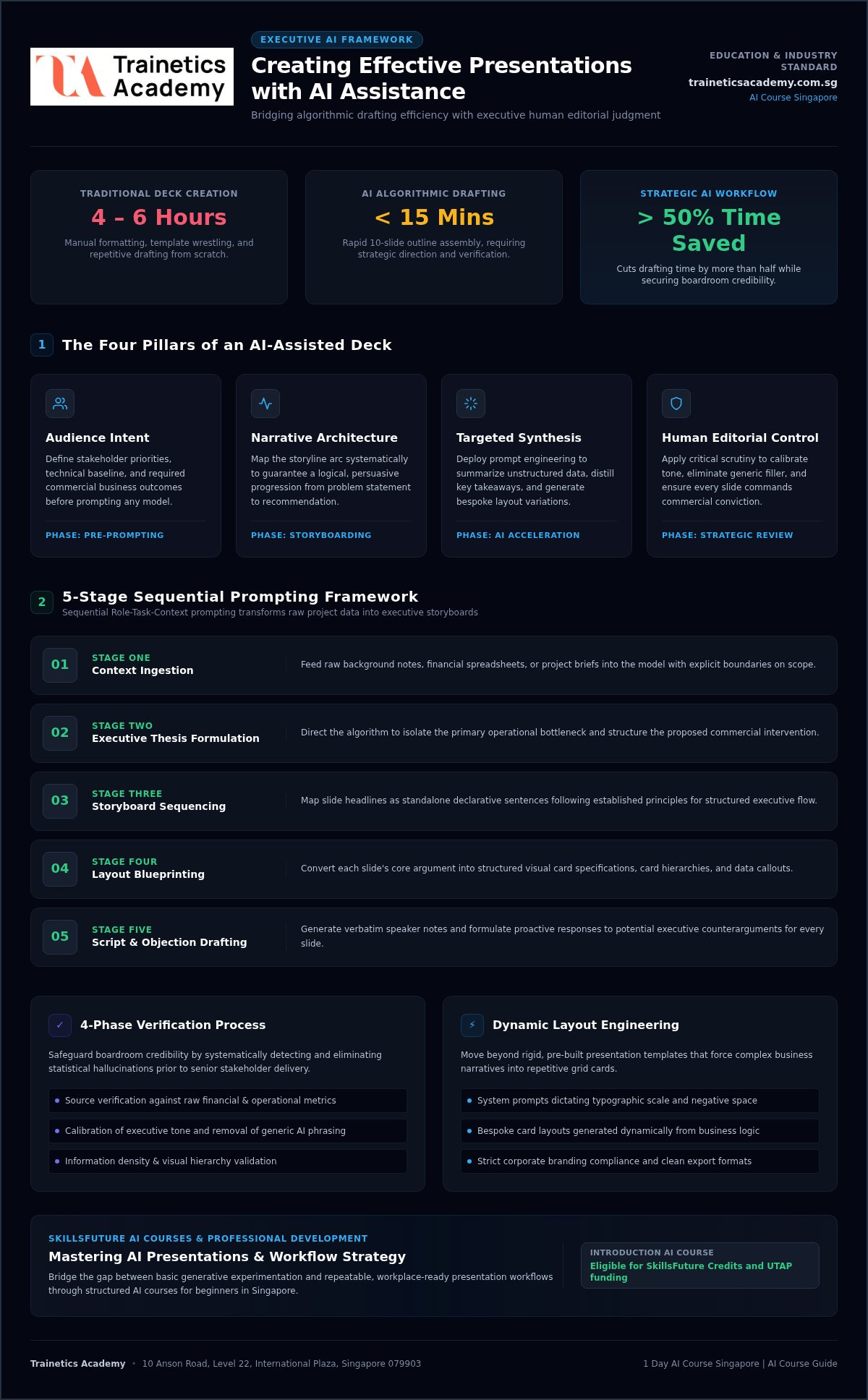
High-stakes business presentations require structural rigor before visual styling takes place. Master these four foundational pillars to maintain complete editorial control:
- Audience Intent: Define the decision-makers’ priorities, technical baseline, and required business outcomes before prompting any platform.
- Narrative Architecture: Map your storyline arc on paper or plain text to guarantee a logical progression from problem statement to recommendation.
- Targeted Synthesis: Deploy foundational prompt engineering techniques to summarize unstructured data, extract executive takeaways, and brainstorm layout variations.
- Human Editorial Authority: Apply critical judgment to calibrate tone, trim unnecessary points, and ensure the slide flow builds genuine commercial conviction.
Moving Beyond Simple Slide Templates
Rigid, pre-built templates force complex business data into generic containers. Boardrooms quickly tune out repetitive grid cards and decorative iconography that fail to convey real meaning. Modern generative tools let you escape these visual clichés by generating custom layouts dynamically from natural language instructions.
By establishing explicit system prompts that define card hierarchy, typographic scale, and negative space, you protect visual clarity across every slide. Creating effective presentations with AI assistance means you dictate brand constraints and information density, using software to construct bespoke layouts that serve your narrative rather than restrict it.
Step-by-Step Prompting Framework: From Raw Ideas to Storyboards
Single-prompt commands such as “make a ten-slide deck about our Q3 results” consistently fail. They generate superficial bullet lists that lack commercial depth. Creating effective presentations with AI assistance demands a structured, sequential prompting chain. By feeding the model distinct roles, clear business context, and explicit output constraints, you turn messy project documents into tightly sequenced executive outlines.
Execute this five-stage sequence to build your baseline deck architecture:
- Context Ingestion: Feed raw background notes, financial spreadsheets, or project briefs into the model with explicit boundaries on scope.
- Executive Thesis Formulation: Direct the algorithm to isolate the primary operational bottleneck and proposed intervention.
- Storyboard Sequencing: Map slide headlines as standalone declarative sentences following established principles for structuring a slide presentation effectively.
- Layout Blueprinting: Convert each slide’s core argument into structured visual card specifications and data callouts.
- Script & Objection Drafting: Generate verbatim speaker notes and executive counterarguments for every slide.
Prompting for Audience Persona and Storyline
Tailor your system prompt by specifying the exact stakeholders in the room. Instruct the model to adopt the perspective of an enterprise strategy consultant applying Barbara Minto’s Pyramid Principle. Direct it to state the governing recommendation first, followed by supporting operational pillars.
Require the model to identify the core commercial tension, the immediate complication, and the operational payoff. This structure eliminates narrative drift and ensures every slide justifies its presence before senior leadership.
Developing Slide-by-Slide Visual Blueprints
Executive attention degrades when slides become cluttered reading documents. Use strict formatting constraints in your prompts. Instruct the AI to enforce one governing idea per slide, separating the lead claim from supporting data.
Command the tool to generate visual direction rather than raw text blocks. Ask for data tables, comparative matrix layouts, or chronological milestone flows instead of bulleted paragraphs. This approach preserves clear visual hierarchy and prevents cognitive fatigue across the room.
Automating Speaker Notes and Q&A Preparation
Persuasion depends on verbal delivery as much as visual clarity. When generating slide outlines, prompt the model concurrently to write detailed speaker notes. Ask it to expand on the concise slide copy with operational nuances, contextual background, and narrative bridges between topics.
Prompt the system to challenge its own logic. Have it analyze the generated deck to surface three severe stakeholder objections, then draft an appendix slide addressing each risk directly. Mastering these structured scripting techniques is an essential workplace skill taught in a comprehensive AI Course, ensuring your presentation stands up to intense boardroom scrutiny.
Selecting and Combining AI Tools for Slide Design and Visuals
No single software platform solves every presentation challenge. Enterprise software generally divides into three distinct categories: large language models for text synthesis, native ecosystem assistants, and dedicated generative slide platforms. Mastering these categories lets you assemble an adaptable workflow that respects corporate data governance while eliminating manual formatting friction.
Creating effective presentations with AI assistance requires combining specialized tools strategically rather than relying on one catch-all interface. A sound enterprise toolstack balances raw generation speed against visual control and security compliance:
- Text Synthesizers: Advanced language engines digest complex source documents, define core executive narratives, and draft speaker notes.
- Native Ecosystem Assistants: Integrated copilots inside standard office suites build slides directly within existing enterprise templates, keeping sensitive data inside corporate boundaries.
- Dedicated Slide Generators: Autonomous platforms construct polished cards, balance whitespace, and apply adaptive visual layouts in seconds.
Native Enterprise Copilots Versus Specialized Slide Builders
Native tools such as Microsoft Copilot excel at regulatory alignment and enterprise file governance. They read internal SharePoint documents securely, populating slides inside your organization’s master theme without exposing proprietary figures to third-party model training.
Dedicated tools like Gamma and Beautiful.ai offer superior visual fluidity for investor pitches and client proposals. Gamma uses autonomous card layouts to create clean, responsive presentations rapidly. Beautiful.ai relies on smart design rules that constrain graphic elements automatically, preserving visual balance whenever team members alter slide copy. To review how these platforms compare across organizational workflows, explore this detailed guide to the top AI productivity tools for business.
Generating High-Impact Data Visualizations and Diagrams
Raw operational data rarely communicates strategy on its own. Modern generative tools ingest complex spreadsheet tables and propose the most effective visual charts, distinguishing between distribution curves, comparative bar sets, and trendlines. This prevents misleading data visualizations that distort executive understanding.
For multi-stage operational processes, text-to-diagram generators translate narrative workflows into crisp architectural maps and swimlane diagrams. Professionals seeking to master these technical capabilities can tap into SkillsFuture Singapore initiatives, which support continuous workforce upskilling in applied generative software. Creating effective presentations with AI assistance allows you to transform static numbers into clear, persuasive visual narratives that lead directly to informed business decisions.
Refining, Fact-Checking, and Preserving Authenticity in AI Decks
Generative AI frequently invents market metrics, distorts percentages, and attributes claims to non-existent whitepapers. In high-stakes executive meetings, a single fabricated figure instantly destroys professional credibility. Creating effective presentations with AI assistance requires a strict boundary between automated draft generation and rigorous human verification. Algorithms draft rapidly, but professional responsibility for truth and strategic accuracy rests entirely on your shoulders.
The Slide Verification and Data Auditing Checklist
Before circulating an automated slide deck to senior decision-makers, execute this four-phase verification audit:
- Data Origin Verification: Trace every statistic, market forecast, and percentage back to verified internal reports or primary external studies.
- Graphic Integrity Check: Inspect generated chart axes, baseline scales, and units of measurement to ensure data relationships aren’t distorted.
- Enterprise Data Governance: Verify that proprietary customer data, strategic roadmaps, and non-public financials comply with internal confidentiality rules.
- Syntactic Pruning: Cut robotic phrasing, hyperbolic adjectives, and hollow corporate jargon that dilute your core business points.
Infusing Human Perspective and Executive Presence
Algorithms cannot replicate firsthand operational experience or organizational intuition. When refining your slide outlines, replace passive, descriptive titles with decisive executive declarations. A generic heading like “Market Overview and Dynamics” should become “Regional Demand Supports 14 Percent Capacity Expansion.” This shifts the slide from passive commentary to active strategic leadership.
Inject authentic workplace anecdotes, operational context, and strategic conviction into your speaker notes and executive takeaways. Slide decks persuade only when backed by genuine human insight. For professionals seeking to sharpen their narrative conciseness and written persuasion, consult this guide on selecting a business writing course in Singapore.
Creating effective presentations with AI assistance ultimately depends on your ability to interrogate algorithmic output rather than accept it blindly. To build rigorous prompt evaluation habits and safeguard your workplace credibility, enroll in an applied AI Course to master enterprise-grade deck creation and fact-checking protocols.
Mastering AI Slide Creation: Professional Development in Singapore
Software subscriptions and slick interfaces don’t turn confusing data into persuasive executive decks on their own. While autonomous platforms eliminate repetitive layout formatting, they can’t establish commercial priorities or verify operational facts. Creating effective presentations with AI assistance requires disciplined prompt architecture, structured narrative sequencing, and sharp editorial evaluation. That’s why corporate professionals across Singapore are stepping away from isolated trial-and-error experimentation and turning to structured workplace upskilling.
The Advantage of Hands-On Interactive Training
Relying on guesswork with commercial tools often produces generic layouts that fail executive scrutiny. Structured workshops eliminate this frustration by teaching repeatable prompting frameworks tailored for enterprise communication. Under the direct guidance of experienced corporate practitioners, you learn how to convert dense technical documents into crisp storyboards, automate speaker scripts, and build visual hierarchies that hold boardroom attention.
Applied instruction focuses on immediate workplace implementation rather than abstract theory. Professionals can master these productivity workflows through a targeted AI course Singapore professionals trust for career growth, with interactive sessions hosted at 10 Anson Road, Level 22, International Plaza, Singapore 079903.
Subsidies and Course Eligibility for Singapore Professionals
Building practical generative AI skills is accessible for both individual executives and enterprise teams. For those evaluating foundational upskilling options, the Introduction AI Course is eligible for SkillsFuture Credit and UTAP funding. This hands-on curriculum serves as one of the most effective AI courses for beginners, bridging the gap between basic prompting and sophisticated, boardroom-ready business presentations.
Whether you want to explore high-impact SkillsFuture AI courses or enroll in a fast-paced 1 day AI course Singapore professionals use to accelerate daily workflows, guided learning ensures you master presentation efficiency without compromising corporate data governance. Review our comprehensive guide to SkillsFuture courses to explore funding pathways, or consult our strategic advice on how to ask for training to present a clear sponsorship request to your department head. Creating effective presentations with AI assistance isn’t just about shaving minutes off deck preparation; it equips you with an enduring professional advantage in strategic business communication.
Elevate Your Presentation Strategy Through Applied AI Mastery
Algorithmic generation has permanently transformed slide creation, but genuine persuasion remains an inherently human discipline. Creating effective presentations with AI assistance isn’t about letting software dictate your core message. It’s about deploying structured prompts, selecting the right platforms, and auditing operational data with uncompromising rigor. When you unite rapid automated outlining with intentional executive storytelling, you turn deck design from a late-night formatting chore into a decisive commercial advantage.
You don’t have to waste valuable hours on unguided trial and error with commercial tools. Build repeatable, workplace-ready presentation workflows under the guidance of qualified industry practitioners specializing in enterprise productivity. Transform your slide delivery and command boardroom attention with confidence: master AI workflows with an industry-focused AI course at Trainetics Academy and start driving decisive business action today.
Frequently Asked Questions
Can modern AI generate complete, presentation-ready slides from a simple prompt?
No, simple prompts rarely produce finished executive decks. While autonomous platforms generate basic layouts and placeholder copy rapidly, the resulting content often lacks commercial nuance, strategic hierarchy, and accurate data. Creating effective presentations with AI assistance requires a sequential prompting approach where you define the business problem, outline the narrative arc, and review every visual element before presenting to senior management.
How do I prevent generative AI tools from inventing statistics or data in business decks?
You prevent hallucinated numbers by using source-grounded prompting and strict data constraints. Paste raw verified data directly into your prompt context and explicitly instruct the model to cite only the provided figures. Never ask an open-ended model to supply market metrics without specifying an authoritative source. Always audit every percentage, axis baseline, and financial ratio against primary internal documentation.
What is the best prompt structure for turning complex business reports into slides?
The most reliable framework assigns a precise role, defines the executive task, provides bounded context, and enforces output constraints. Specify that the AI act as an enterprise strategy advisor using the Minto Pyramid Principle. Instruct it to distill sections into single-sentence takeaway headlines followed by supporting quantitative bullets, separating slide copy from detailed presenter notes.
Is corporate data safe when using generative tools for slide design?
Data security depends entirely on the deployment model and licensing tier you select. Consumer tiers often use user inputs to train public models, creating confidentiality risks for sensitive financial or operational numbers. Enterprise agreements, such as commercial Microsoft Copilot licenses or dedicated business tiers with data privacy guarantees, isolate corporate prompts within private tenant boundaries to protect intellectual property.
Which AI tools work best for creating professional executive presentations in 2026?
The top platforms divide into native assistants and specialized design tools. Microsoft Copilot excels within existing PowerPoint templates and SharePoint environments, maintaining strict enterprise data governance. For rapid visual layout generation and fluid smart cards, platforms like Gamma and Beautiful.ai deliver polished visual hierarchy while supporting clean exports to standard corporate formats.
How do I maintain my company brand guidelines when generating slides with AI?
Lock your corporate styling rules using native brand kits and structured system prompts. Dedicated presentation platforms allow teams to define primary color palettes, typography scales, and approved logo placement rules. For text generators, include explicit constraints defining your organization’s required tone of voice, forbidden marketing buzzwords, and executive formatting standards.
Can I use government funding for AI presentation and productivity courses in Singapore?
Yes, eligible individuals in Singapore can offset course fees using national training subsidies. At Trainetics Academy, the Introduction AI Course is eligible for SkillsFuture Credit and UTAP funding. This hands-on program helps business professionals master enterprise prompt frameworks, data visualization tools, and workplace productivity workflows through structured classroom instruction.
Disclaimer
AI Content Disclaimer: Some articles on this website may be generated or assisted by AI-powered content creation tools. While we strive for accuracy and relevance, readers should independently verify information before relying on it. The content is provided for informational purposes only and does not constitute professional advice.