A routine project update can become a source of confusion when a deadline, decision, or next step is left unclear. AI tools for workplace communication can help draft and refine messages, but they can also miss context or make wording sound unlike you. Clear communication takes more than a polished sentence. It requires judgement about what to say, what to verify, and what should stay human.
If you’re unsure which tools are useful or how much to trust their output, that caution is sensible. AI can help organise ideas, summarise discussions, and adjust tone, but it shouldn’t take responsibility for meaning or accuracy. You remain accountable for the message you send.
This guide explains where AI can provide practical support and where human review matters most. You’ll learn a repeatable process for checking AI-assisted messages before sending them, ways to reduce the risk of unclear or inaccurate wording, and foundational skills for using AI responsibly at work. Whether you work with colleagues in Singapore or across locations, a structured approach can help you build tool familiarity while strengthening the communication judgement that makes every message effective.
Key Takeaways
- Match AI tools for workplace communication to the task, whether you’re drafting, summarising meetings, or coordinating with colleagues.
- Give AI a clear task and appropriate context, then check its output against the facts and your intended meaning.
- Compare tools using practical criteria such as review controls, integrations, privacy practices, and accessibility.
- Use a repeatable review-first workflow to tailor each message to its audience before sending.
- Build practical AI skills by identifying the communication tasks you handle often and learning how to prompt, evaluate, and revise AI output.
How AI Tools for Workplace Communication Can Help Reduce Misunderstandings
Workplace communication can break down when a request is unclear, an update is dense, the tone misses its audience, or a follow-up is overlooked. Studying AI tools for workplace communication can help learners explore how these systems support drafting, clarifying, and organising messages, while keeping human judgement central.
That distinction is foundational. An AI system can suggest wording, but it can’t reliably interpret every workplace relationship, expectation, or consequence. Learning to use AI should therefore build more than tool familiarity. It should develop the habit of checking whether a message is accurate, appropriate, and clear before anyone sends it.
Understanding AI’s workplace impact is also part of responsible learning. This overview of the impact of artificial intelligence on workers discusses broader considerations, including potential psychosocial effects.
For examples of AI use in professional communication, watch this video:
AI tools for workplace communication are systems that help people create, clarify, or organise messages; the sender remains accountable for the final communication. This definition is a useful starting point because it separates what a tool can do from the responsibility of the person using it.
Which workplace communication tasks can AI support?
In practical exercises, learners can explore how AI drafts emails from bullet points, condenses supplied notes, rewrites dense wording, or adapts a message for different audiences. For example, rough project notes could become a concise status update with separate sections for progress, open questions, and next steps. Before using the draft, confirm that it reflects the source and adds no unsupported details.
Meeting summaries offer another useful practice task. Compare a generated summary with the original discussion or notes, checking whether a decision, qualification, or action owner has been omitted or misrepresented.
What AI assistance cannot replace
Responsible AI use also means recognising the limits of generated communication. Sensitive conversations call for empathy, context, and human decision-making. A system may miss implied meaning, organisational history, or cultural nuance, so users need to decide when a message requires a person’s judgement rather than another rewrite.
The sender owns the final wording, facts, and intended action. Building that judgement alongside tool familiarity is a central aim of structured AI education. Trainetics Academy offers an artificial intelligence course for individuals and organisations, with learning available through physical and virtual platforms.
How AI Communication Tools Turn Notes into Clearer Workplace Messages
Large language models generate text using patterns learned from language, along with the instructions and context supplied in a prompt. They can turn rough notes into a structured draft, but they don’t independently confirm whether the details are true. The result depends partly on the information provided and how clearly the task is described.
AI-generated wording is a suggestion to check, not a source of verified facts. Treat it as a working draft: provide suitable context, request a specific output, review the response, then revise it yourself. This review also matters for trust. Harvard Business School research discusses how employees may respond to AI-generated communication, reinforcing the value of keeping human judgement visible in the process.
Specific prompts give the tool clearer boundaries. Name the audience, purpose, format, tone, and level of detail you need. For example, ask for a concise internal email that lists a meeting decision, an open question, and the next action. If you need a neutral tone, say so instead of relying on the tool to infer it.
From rough notes to a concise message
Start with notes that contain only the details needed for the task. Before entering workplace information into an AI tool, remove confidential details unless your organisation’s policy permits their use. Then specify the structure and ask the tool to flag gaps rather than fill them with guesses.
A prompt might read: “Turn these notes into a concise follow-up email for the project team. Separate confirmed decisions from open questions, list the next action, and flag any missing details. Don’t invent names, dates, or commitments.” This gives the model a clear format and makes uncertainty easier to spot.
Summaries, tone adjustments, and action items
AI can organise meeting notes into themes, decisions, and follow-up items, or revise a draft to sound warmer or more direct. Use tone instructions to change the delivery, not the substance. For instance, ask for a more courteous version while preserving the original request and commitments.
Before sharing the result, compare it with the source notes. Confirm names, dates, decisions, and who owns each action. Check that a tentative idea hasn’t become a firm decision and that the revised tone hasn’t softened an important request. Structured AI learning can help you practise these skills. Explore artificial intelligence courses as one way to build foundational understanding.
How to Compare AI Tools for Workplace Communication Responsibly
The right tool depends on the communication task, not how impressive a demo looks. A polished response can still be inaccurate, incomplete, or unsuitable for its audience. Compare tools against your team’s real workflow, then verify current features and terms instead of relying on product labels or assumptions.
Use this framework to assess the main categories of AI tools for workplace communication:
| Tool category | Task fit | Review controls | Integrations | Privacy and accessibility |
|---|---|---|---|---|
| Drafting assistants | First drafts of emails, announcements, or documents | Can you edit, compare, or reject suggestions? | Does it fit the tools your team already uses? | Check data-handling terms and accessible ways to review output |
| Meeting transcription or summary tools | Transcripts, summaries, and follow-up notes | Can you check the transcript against the recording or notes? | Can outputs be used in your existing meeting workflow? | Check recording settings, access controls, consent, and policy |
| Collaboration platforms | AI features within shared workspaces and communication channels | Can users verify, edit, and control generated content? | Confirm which features work with your team’s current setup | Review current vendor documentation and accessibility options |
Which AI tool category suits each communication need?
Choose drafting support to shape an email or prepare an initial announcement. Transcription and summarisation tools may suit meetings where a written record or follow-up is useful, but check applicable consent expectations and workplace policy before recording or processing a discussion. Collaboration platforms can bring AI features into existing workflows, though capabilities vary by product, plan, and settings. Verify what is currently available instead of assuming every platform offers the same functions.
How to assess privacy, accuracy, and fit
Before entering internal, personal, or sensitive information, check your organisation’s rules. Then consult current vendor documentation for data handling, access settings, retention options, and controls for reviewing or correcting output. For use in Singapore, consult suitable, current organisational and regulatory guidance. Don’t treat general tool descriptions as compliance advice.
Assess accessibility as part of fit, too. Consider whether intended users can access the tool and review its output in the formats and workflows they need. A short trial using non-sensitive, representative tasks can reveal whether the tool supports communication without bypassing human checks. Structured AI learning can also help teams develop the judgement to evaluate these workflows. Explore artificial intelligence courses as a relevant learning resource.
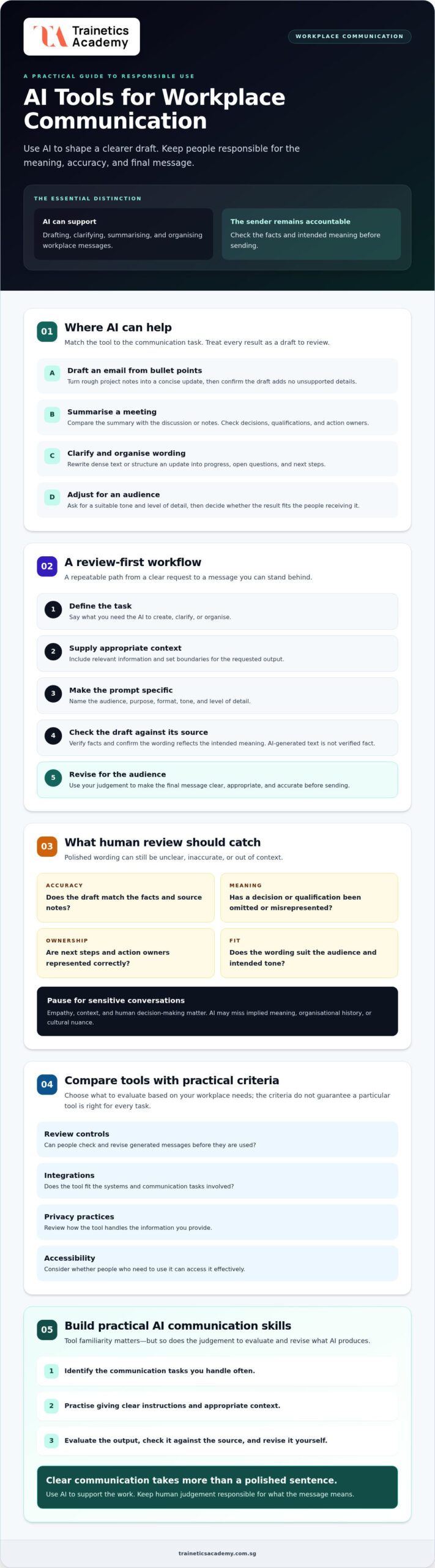
How to Use AI for Workplace Communication: A Review-First Workflow
A reliable workflow keeps the employee in control from prompt to send. Use these steps to make AI tools for workplace communication useful without treating their output as ready-made truth.
- Define the audience. Decide who will receive the message and what they need to understand or do.
- Provide safe context. Include only information needed for the task. Remove personal, confidential, or sensitive details unless workplace policy permits their use.
- Specify the task. State the purpose, key facts, preferred tone, and format. Ask the tool to preserve supplied information and flag gaps rather than fill them.
- Review the draft. Check accuracy, tone, missing context, confidentiality, and whether the intended action is clear.
- Revise and send. Replace generic wording with language suited to the recipient, then send only when the final message reflects your intent.
How to write a useful prompt for a work message
A strong prompt sets boundaries as well as direction. Name the audience and purpose, provide verified facts, and request a format such as a short email or a few bullet points. Add a tone instruction, for example, “professional and approachable,” and ask the tool to identify unclear details. Use anonymised or non-sensitive examples when testing prompts, and follow your organisation’s rules for AI use.
Prompt example: “Write a brief message for the project group using only the facts below. Keep the tone professional and approachable. State the purpose and next action. Don’t add commitments or details; flag anything unclear.”
What to review before sharing AI-assisted content
Compare every factual detail and action with the original source. Check names, dates, decisions, and assigned responsibilities where they appear. Make sure the wording follows workplace policies and meets the recipient’s needs. If the draft sounds generic, revise it so it is appropriately personal without changing the meaning or making promises you didn’t intend.
For example, rough wording might read: “The document is ready. Look at it.” A clearer version could be: “The document is ready for your review. Please share any feedback.” The revision clarifies the requested action without adding a deadline or claiming anything beyond the supplied note.
Before sending, confirm that the message is accurate, appropriate for its audience, free of information you shouldn’t share, complete enough to act on, and true to your intended meaning. Practising this review-first method is one way to strengthen responsible AI capability. Explore Trainetics Academy’s artificial intelligence course as a structured starting point.
Build Practical AI Communication Skills Through Structured Learning
Using AI well at work takes more than knowing which buttons to press. Employees need practice writing clear prompts, evaluating generated content, communicating for different audiences, and deciding when AI is unsuitable. These skills work together: a well-phrased request can still produce a weak message if the user doesn’t verify its meaning or fit.
What to look for in an AI course for workplace application
Look for learning that connects AI concepts with realistic professional tasks. Useful areas to assess include prompt design, output evaluation, and responsible use, alongside practice in refining workplace messages. Check the current course outline and delivery details before enrolling to confirm they match your learning needs. Trainetics Academy’s AI course in Singapore is one option to explore as you compare learning opportunities.
Turn learning into a team communication practice
Choose a low-risk, repeatable task, such as turning non-sensitive notes into a draft internal update. Agree on who reviews the result and what they check before sharing it. Document the workflow internally so colleagues follow consistent expectations, while treating that document as workplace guidance rather than legal advice. Alongside digital workflows, developing interpersonal trust through shared interactive experiences also strengthens workplace collaboration; teams looking to build rapport offline can discover TeamLabs for professionally facilitated team-building activities in Singapore.
Then refine the practice. Ask whether the draft stays faithful to its source, suits its audience, and makes the next action clear. Update the workflow when tools or team needs change. For wider reading, connect this approach with your guides on AI productivity tools for business, professional communication, and the AI Course Singapore. These can help readers consider tool use, communication standards, and learning options together.
Structured learning can help you build a sound foundation for using AI tools for workplace communication with care. Explore Trainetics Academy’s artificial intelligence course to review the available course information and consider whether it fits your professional learning goals.
Make Clearer Workplace Communication a Consistent Practice
AI tools for workplace communication can help organise notes, refine wording, and prepare messages for different audiences. Their value depends on a disciplined process: choose a tool that fits the task, provide suitable context, and review the output for accuracy, tone, confidentiality, and clear next steps. A polished draft still needs human judgement before it’s shared.
Build those habits through practice. Identify the messages you handle often, then strengthen your skills in prompting, evaluating AI output, and adapting communication to its audience. A repeatable review process helps turn tool familiarity into responsible workplace capability.
Trainetics Academy offers AI training for individuals and organisations, with learning available through physical and virtual platforms. Explore the course information and consider how structured learning may support your professional development. Explore Trainetics Academy’s artificial intelligence course to take the next step towards using AI with greater confidence and care.
Frequently Asked Questions
Can AI tools write workplace emails for me?
Yes, AI can create a first draft when you provide clear instructions and suitable context. Specify the email’s purpose, recipient, key facts, and preferred tone, then check that the draft reflects them accurately. Verify the audience, facts, and intended action before sending, and follow your organisation’s rules on confidential information. AI can assist with wording, but you remain responsible for the final message.
How can AI help prevent miscommunication at work?
AI can help organise ideas, clarify wording, summarise supplied notes, and flag phrases that may be ambiguous. These are review aids, not guarantees that a message will be understood. Compare the result with the original context, then check that the recipient can identify the message’s purpose and next step. For example, ask AI to make a long update easier to scan, then verify that no important qualification has been lost.
Are AI-generated meeting summaries accurate?
They can be useful, but accuracy depends on the source material, audio or notes, and the tool’s output. A summary may omit nuance or misstate names, decisions, or responsibilities. Compare it with the original meeting record before relying on it. For important decisions, ask participants to confirm the summary before action is taken. Treat unclear points as questions to resolve, not details for the tool to guess.
Is it safe to put work information into an AI tool?
It depends on the tool, its settings, your organisation’s policy, and the information involved. Don’t enter confidential or personal information unless your organisation permits it. Review the tool provider’s current data-handling terms and check which settings affect access or use of submitted content. If internal requirements are unclear, ask the appropriate person or team before using workplace material. Avoid assuming that a familiar tool is suitable for every type of information.
What should I check before sending an AI-written message?
Check factual accuracy, missing context, tone, recipient, confidentiality, and whether the requested action is clear. Remove unsupported claims and revise wording that sounds generic or could mislead the reader. Make sure the message reflects your intended meaning and doesn’t imply commitments you haven’t made. For sensitive topics, apply human judgement and follow your organisation’s communication process rather than relying on AI alone.
Do employees need AI training to use workplace communication tools?
Training can help employees write clearer prompts, assess generated content, recognise limitations, and follow workplace expectations. The right learning depends on a person’s role and recurring tasks, such as drafting updates or reviewing summaries. Choose practical AI education that develops both tool use and critical review. Access to a tool alone doesn’t ensure that employees know how to use its output responsibly or judge when it needs revision.
How can a team introduce AI tools for workplace communication?
Start with a clear, low-risk use case, check internal policies, and agree who will review AI-assisted messages before sharing them. Gather feedback on clarity and usefulness, then refine the workflow based on what the team learns. Avoid assuming one approach will suit every organisation: tools, information sensitivity, and communication processes vary. A small, well-defined trial can help the team identify practical checks before considering broader use.
Disclaimer
AI Content Disclaimer: Some articles on this website may be generated or assisted by AI-powered content creation tools. While we strive for accuracy and relevance, readers should independently verify information before relying on it. The content is provided for informational purposes only and does not constitute professional advice.