If you’re searching for “How to create a chatbot for my website,” start by thinking about what visitors need and what information the chatbot can reliably provide. Understanding AI can help you assess where a tool may be useful, what it cannot reliably do, and which decisions still need human judgement. A website chatbot offers a practical example of those considerations.
For learners exploring AI courses for beginners or comparing SkillsFuture AI courses, a useful starting point is a clear understanding of AI concepts and their real-world applications. If a 1 day AI course Singapore option is on your shortlist, consider how its subject matter fits your learning goals. An AI course in Singapore should support informed thinking about technology, not just familiarity with tools.
This guide uses chatbot creation as a practical case study, showing how to define its purpose, prepare source content, set limits, test responses, and improve the experience over time. You’ll gain a structured way to evaluate the technology and make considered decisions as your AI knowledge develops.
Key Takeaways
- Start with one visitor need, such as answering recurring questions or directing people to relevant information.
- Compare hosted builders, website-platform features, and custom integrations by setup effort, control, and ongoing maintenance.
- For a website chatbot, prepare current, relevant source content and remove outdated or conflicting material.
- Follow a clear build sequence, from defining scope to testing and embedding. Exact steps depend on your chosen approach.
- Review early conversations to identify gaps, then refine the chatbot’s content, fallback messages, and task boundaries.
How a Website Chatbot Helps Visitors, and What It Should Do First
A website chatbot is software that interacts with visitors through a chat interface. Depending on how it is designed, it may follow set rules or use AI to interpret questions and generate responses. For a concise overview of the term and its different forms, see What is a Chatbot?
A chatbot can help visitors find answers without searching several pages. It might respond to recurring questions about a service, explain where to find a form, or direct someone to the right section of a website. The best first task is specific and repeatable, not an open-ended promise to manage every conversation.
A chatbot’s usefulness depends on a clearly defined purpose and reliable source content. Before you decide how to create a chatbot for your website, identify where visitors need help and what information can support a dependable answer.
Choose one visitor problem before choosing chatbot features
Start with a question visitors ask repeatedly or a simple task they struggle to complete. For example, a visitor might need directions to a particular information page or want to know which form applies to their request. Consider who is asking and when: a new visitor comparing options may need different guidance from a returning customer looking for a specific detail.
Then define the chatbot’s boundary. A first version could answer questions about one section of the site rather than attempting to cover every product, policy, and personal situation. This makes it easier to prepare relevant answers and recognise when a question falls outside the chatbot’s role. It also gives you a practical way to judge whether the tool is helping: can visitors complete the task or reach the right information with less confusion?
Set expectations for answers and human help
Automated answers should stay within topics supported by current, reliable material. If the source content does not address a question, the chatbot should say so plainly instead of guessing. This matters for details that can change, such as service terms or instructions. Assign someone to review the content so outdated information does not quietly become part of the chatbot’s responses.
Some requests need individual judgement. A visitor may describe an unusual circumstance, raise a complaint, or ask for advice that depends on personal details. In these cases, the chatbot should offer a clear route to a person, such as a contact form, email address, or phone number published on the website. Explain what the visitor can do next without implying an immediate response.
Before launch, write a fallback message for questions the chatbot cannot answer. Keep it respectful and direct: state the limitation, point to relevant information if available, and explain how the visitor can continue with a person. A well-scoped chatbot does not need to appear capable of everything. It needs to handle its defined task responsibly and make the next step clear when human help is more appropriate.
Which Website Chatbot Approach Fits Your Skills and Website?
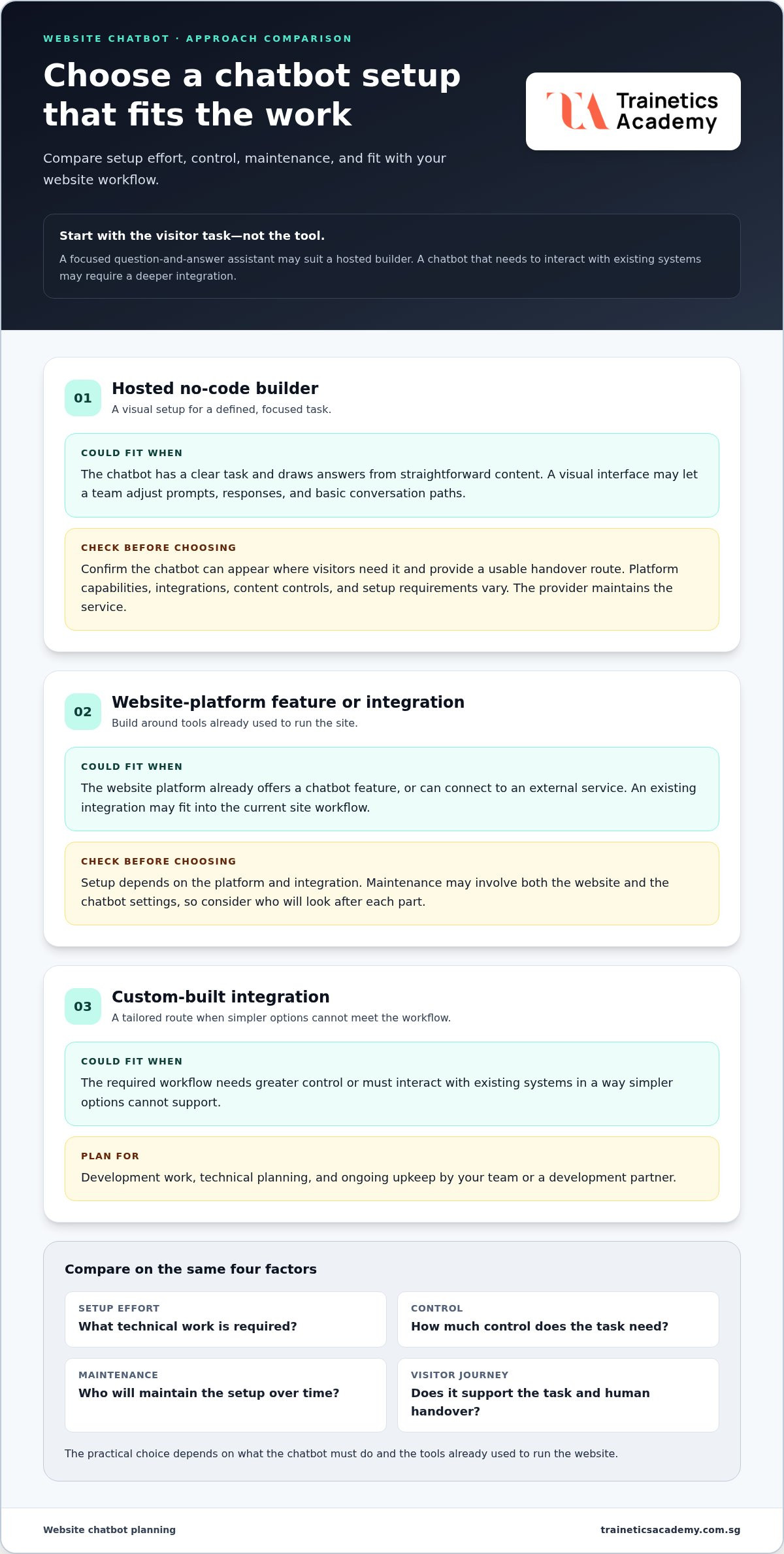
With the chatbot’s task defined, compare implementation approaches by more than how quickly they appear to launch. Consider the technical work required, how much control you need, who will maintain the setup, and whether it supports the visitor journey. IBM’s overview of the benefits of chatbots for businesses also describes how different chatbot technologies can serve different purposes.
The practical choice depends on both the work the bot must do and the tools already used to run the site. A straightforward question-and-answer assistant may suit a hosted builder. A chatbot that must interact with existing systems may need a deeper integration.
| Approach | Setup and control | Maintenance and fit |
|---|---|---|
| Hosted no-code builder | Often configured through a visual interface. Options vary by platform. | The platform provider maintains the service. Suits focused tasks if the required placement and handover options are supported. |
| Website-platform feature or integration | May fit into existing site tools, but setup depends on the platform and integration. | Maintenance may involve both the website and chatbot settings. Useful when the feature fits the existing site workflow. |
| Custom-built integration | Can provide greater control, but typically requires development work and technical planning. | Your team or development partner must account for ongoing upkeep. Consider it when simpler options cannot meet the required workflow. |
When a no-code chatbot builder is a practical starting point
A hosted builder can be a sensible starting point when the bot has a defined task and its answers draw on straightforward content. Visual configuration may let a team adjust prompts, responses, and basic conversation paths without building the whole interface from scratch. However, “no-code” does not mean every setup is effortless or free of technical decisions.
Before choosing this route, map the visitor journey. Check whether the builder can appear where visitors need it and provide a usable handover route when the bot reaches its limits. Capabilities, integrations, content controls, and configuration requirements differ between platforms.
When a website integration or custom build may fit better
First review the tools already supporting your website. Its platform may include a chatbot feature or connect with an external service, though available options and setup requirements vary. An existing integration can reduce the need to manage separate components, but it still needs to fit the site’s structure and the chatbot’s defined task.
A custom build may be appropriate when the required workflow needs greater control or connections that standard tools do not provide. That flexibility also brings responsibility: plan who will maintain the code, test changes, and keep integrations working as the website evolves. Compare the full ownership commitment, not only the initial setup effort.
Prepare Reliable Content and Clear Answer Boundaries for Your Chatbot
A chatbot can only work with the information it can access. Reliable chatbot answers depend on relevant, current, clearly organised source content. Creating a chatbot for your website therefore involves more than connecting pages to a tool. First decide which information supports the chatbot’s task and which questions it should leave to a person.
Begin with an inventory of material that visitors are allowed to see and that your organisation has selected for this purpose. This may include public website pages, frequently asked questions, service explanations, and published instructions. Review each source before adding it. An old page with superseded details can conflict with an updated FAQ, while duplicated or irrelevant content can make it harder to keep answers focused.
Organise source material around real visitor questions
Group selected content by topic, then check that each item answers a real visitor need. Use plain, consistent wording and make key details easy to locate. If the chatbot is meant to explain a process, for example, provide the relevant steps and conditions together rather than scattering them across several documents.
Prioritise material that directly supports the bot’s defined task. A chatbot designed to direct visitors to the right information does not need every page on the website. A smaller, carefully reviewed collection is easier to manage and reduces the risk of unrelated content shaping an answer. Assign someone to review the source material when site information changes, and remove or replace obsolete versions instead of leaving conflicting copies in place.
- Keep: current public pages and selected answers that directly support the chatbot’s task.
- Review: content with dates, conditions, or details that may change.
- Remove: duplicate, contradictory, outdated, or irrelevant material.
Protect visitor trust with clear limits and escalation
Set boundaries before visitors start using the bot. List the topics it can answer, the questions it should decline, and the situations that require human attention. For example, a bot may provide published instructions but should pass an unusual case requiring individual judgement to a person. Avoid adding personal or sensitive information to its source material unless the chosen setup and applicable policies permit it.
Prepare a fallback for unclear questions and requests outside scope. It should be honest, useful, and specific: say the chatbot cannot answer confidently, point to relevant public information when appropriate, and give a clear human contact route. Do not imply that every enquiry can be resolved automatically. Review these boundaries as the chatbot’s source content changes, so the instructions remain aligned with what it can responsibly answer.
How to Create and Test a Website Chatbot Step by Step
A reliable build process moves from a clearly defined task to a tested chat interface, with each decision supporting the visitor experience. Define the scope, choose an approach, prepare content, configure the chatbot, test its responses, then embed it on your website. The exact setup varies by builder, website platform, and development approach, so follow the instructions for the option you selected rather than assuming every tool uses the same steps.
If you’re working out how to create a chatbot for your website, use this sequence to keep the first version focused:
- Define the scope. State who the chatbot serves, what it helps with, and which questions it should pass to a person.
- Select an approach. Match a hosted builder, a website-platform feature, or a custom integration to the task and your team’s technical capacity.
- Prepare the content. Gather the current, relevant source material the chatbot is allowed to use, and remove outdated or conflicting versions.
- Configure the interaction. Set the welcome message, connect suitable content, and write fallback and handover responses.
- Test the experience. Check representative questions, unclear wording, unsupported requests, and human escalation.
- Embed the interface. Add the chatbot using the selected tool’s instructions, then inspect it on the live website before promoting it to visitors.
Configure the first version around a defined task
Write a welcome message that tells visitors what the chatbot can help them do. For example: “I can help you find information about registration and course details.” Keep the promise aligned with the available source material. Connect only the content relevant to that task, then configure a fallback that acknowledges when the answer is unavailable and explains how to reach human help.
Next, add the chat interface following the chosen platform’s or integration’s setup guidance. Depending on the option, this could involve adjusting settings in a visual dashboard or completing technical configuration. Check that the interface appears on the pages where visitors need assistance, without obscuring key content or navigation.
Test real questions before publishing
Build a test set from actual visitor needs. Include direct questions and different phrasings of the same request, such as “Where can I register?” and “How do I sign up?” Add ambiguous wording and questions the chatbot should not answer. Review whether each response stays grounded in its source content, and whether out-of-scope requests trigger the intended fallback instead of a guess.
Test the whole journey on desktop and mobile. Confirm that visitors can read and use the chat interface, continue browsing the site, and follow the human handover route. Correct confusing answers, broken links, or display problems before making the chatbot public. There is no universal setup time. Careful testing is more valuable than rushing to launch.
After publishing, keep a record of issues found during testing and the changes made to address them. This gives the team a practical reference for future reviews and helps maintain a consistent experience as the site and chatbot evolve.
Launch, Improve, and Build Your AI Understanding Over Time
A chatbot’s launch is the start of a review cycle, not the end of the work. Begin with a limited rollout, such as placing it on the pages most closely connected to its defined task. Watch for questions it cannot answer, responses visitors find unclear, and requests that fall outside its scope. These examples can guide improvements before you extend its role.
To assess whether the chatbot is useful, focus on the visitor’s next step. Can people find the information they came for? When the chatbot cannot help, can they reach the right human contact route? These practical signals are more valuable than simply counting conversations. The aim is to improve a specific experience, not to make the chatbot handle every enquiry.
Use visitor feedback to maintain answer quality
Review conversation records and feedback at regular intervals, while respecting the settings and policies that apply to your chosen tool. Group recurring issues: a question may be missing from the source content, phrased differently from the material, or better handled by a person. Update the relevant page or chatbot content, then test the revised answer to make sure it remains clear and within scope.
Keep chatbot content aligned with the live website. If a page changes, update its chatbot source material too; otherwise, visitors may receive outdated guidance. Assign responsibility for reviewing those changes so updates are not missed. Human support should remain available for sensitive, unusual, or unresolved situations. A clear handover is part of a responsible chatbot experience, not a sign that automation has failed.
Develop broader AI understanding alongside practical experimentation
Practical testing reveals how a chatbot behaves on your site. Broader AI knowledge helps you interpret why its capabilities have limits and make informed decisions about where automation is appropriate. Understanding the difference between a response generated from source material and a confirmed human answer can also help teams set sensible expectations and review outputs with care.
Learning core AI concepts can complement implementation decisions without replacing careful content preparation, testing, or human judgement. Trainetics Academy’s Artificial Intelligence course offers a broader learning option for those building their understanding of AI.
Keep the process disciplined: review real interactions, correct the source material or fallback where needed, and adjust the chatbot’s task only when the evidence supports it. Each refinement should make the visitor journey clearer while preserving a reliable path to human help.
Explore AI learning with Trainetics Academy as you continue developing your understanding of artificial intelligence.
Make Your Next AI Decision with Confidence
Creating a chatbot for your website is not only a technical task. It is also an opportunity to think critically about how AI should support people, where its limits lie, and what a responsible experience looks like. Let the questions visitors ask guide your decisions, and treat each improvement as a chance to strengthen your judgement as well as the tool.
As AI capabilities develop, a stronger grasp of the fundamentals can help you evaluate new uses with clarity rather than adopting features simply because they are available. Build that understanding at a pace that suits your goals, and apply it thoughtfully to the needs of your organisation and its visitors.
Trainetics Academy offers an Artificial Intelligence course, also listed as Introduction to Artificial Intelligence, with interactive learning and online and offline options. Explore Trainetics Academy’s Artificial Intelligence course to build your understanding and make more informed decisions about AI.
Frequently Asked Questions
Can I create a chatbot for my website without coding?
Sometimes. How to create a chatbot for your website depends on the builder and the workflow you need. Some hosted builders and website integrations provide visual setup, while more specialised functions may call for technical configuration or development. Start with one visitor task, such as finding a page or answering a standard question. Then review the chosen platform’s setup guidance to understand what skills and website access the implementation requires.
How do I add a chatbot to my website?
Choose a suitable approach, configure the chatbot for its intended task, and test its responses before adding it to your site. Depending on the tool, you may use a built-in website integration or follow an embed method provided by the platform. Instructions vary, so use the documentation for your specific setup. Before visitors rely on it, check that the interface displays correctly and that the handover route leads to a usable human contact option.
What should I teach a website chatbot to answer?
Begin with recurring visitor questions that have clear answers in current website content, such as where to find a published policy or how to locate a registration page. Keep the chatbot’s remit narrow enough that you can tell whether a question belongs within it. Include directions for requests it cannot handle, such as an unusual case requiring personal judgement. A useful chatbot should guide visitors to relevant information, not make decisions beyond its defined role.
How can I make my website chatbot give accurate answers?
Accuracy depends partly on the source material and how the chatbot is configured, so keep both relevant, clear, and maintained. Test realistic questions, including different ways of asking for the same information, and compare each response with the source. For example, check whether a short, informal question produces the same supported guidance as a formal one. Review questions the bot could not answer, then decide whether to improve the content, adjust its scope, or retain a human handover.
Should I use a chatbot builder or build a custom chatbot?
A hosted builder can suit an initial chatbot with a focused task and straightforward content. Website-platform integrations may be convenient if they fit your existing tools and site workflow. Custom development can offer more control for specialised processes, but it also requires the technical capacity to maintain it. There is no universal best option. Compare the actual requirements, your team’s skills, and the ongoing work needed to keep the chatbot and its connections functioning as intended.
What happens if my website chatbot cannot answer a visitor’s question?
It should acknowledge its limitation and offer a clear next step, such as a relevant information page or a published route to human support. Avoid wording that implies a person will respond immediately unless that timing is established. Unanswered questions can also reveal useful improvements: perhaps an instruction is missing, a page is unclear, or the chatbot is being asked to handle something outside its role. Review these cases and adjust the content or scope where appropriate.
How do I test a chatbot before launching it on my website?
Test common requests, alternate phrasings, ambiguous questions, and requests beyond the chatbot’s remit. Verify responses against the source content, then check that an unanswered question triggers a helpful fallback and that human handover works. Review the chat on relevant screen sizes, including a phone, to catch layout or navigation issues. Correct problems before launch. After publishing, continue reviewing interactions so you can spot new gaps and make considered improvements.
Disclaimer
AI Content Disclaimer: Some articles on this website may be generated or assisted by AI-powered content creation tools. While we strive for accuracy and relevance, readers should independently verify information before relying on it. The content is provided for informational purposes only and does not constitute professional advice.