AI is more likely to change parts of your job than replace an entire role. It can take on some routine tasks, while people remain responsible for judgment, creativity and decisions. Overcoming fear of AI at work starts with identifying where the technology can support your contribution, rather than define your value.
It’s reasonable to feel uncertain when familiar tasks change. You don’t have to master every tool at once. Small, low-risk experiments can show you what AI does well, where it falls short and which tasks you want to keep in your own hands.
This article explains how AI can complement human work, how to explore prompts and platforms with purpose, and why human oversight matters when using AI-generated content. You’ll also learn how practical AI education can build the confidence and judgment to use these tools more effectively at work.
Key Takeaways
- Understand how AI can automate parts of a role while leaving people to contribute judgment, creativity and problem-solving.
- Build confidence by testing prompts and AI platforms on suitable, low-risk tasks.
- Separate concerns about job change from claims about widespread job loss by examining what automation risk actually measures.
- Review AI-generated work for accuracy, relevance and context before relying on it.
- Identify repetitive tasks that may be suitable for automation and consider where human input adds the most value.
AI augmenting rather than replacing jobs
Generative AI can automate individual tasks without taking over an entire role. The International Labour Organization expects augmentation to be more likely than job destruction.
Human Skills AI Cannot Replace
Human skills include empathy, creativity, adaptability and leadership. They rely on understanding people and context, and are especially important when work calls for trust, judgment or a response tailored to someone’s needs. For individuals looking to build their interpersonal communication and confidence in professional environments, programs like Social Skills Australia demonstrate how evidence-based training can strengthen these essential human abilities.
For example, AI can draft a client reply, but a staff member must interpret the client’s concern and choose an appropriate response. A manager can use AI to organise feedback, yet still needs to lead a difficult conversation. Singapore Global Network notes that as AI takes on routine tasks, problem-solving becomes more valuable.
Research on AI’s effect on jobs distinguishes automating tasks from eliminating entire occupations. Wages and productivity depend partly on how employers redesign work and distribute gains in time or output. If AI helps a team prepare drafts faster, employees may use the saved time for analysis, but the tool itself doesn’t determine how pay changes.
Tasks Most Likely to Be Automated
Tasks most exposed to automation are routine, repeatable activities with clear inputs and outputs. Identifying them helps employees decide where AI could assist without handing over responsibility for the final result.
Examples include sorting information, producing a first draft, summarising documents and checking grammar. A worker might ask AI to group meeting notes by theme, then verify each theme against the original. This separates mechanical processing from decisions that require context.
By contrast, resolving an unusual customer complaint involves interpreting intent, weighing trade-offs and communicating with care. AI may suggest responses, but the employee brings knowledge of the relationship and business priorities. Think of automation as task-specific: a role can include both automatable steps and work requiring human judgment.
Skills for Working Effectively With AI
Working effectively with AI means framing clear requests, assessing outputs and recognising which tasks need human review. These skills help employees use tools deliberately instead of accepting fluent answers without scrutiny.
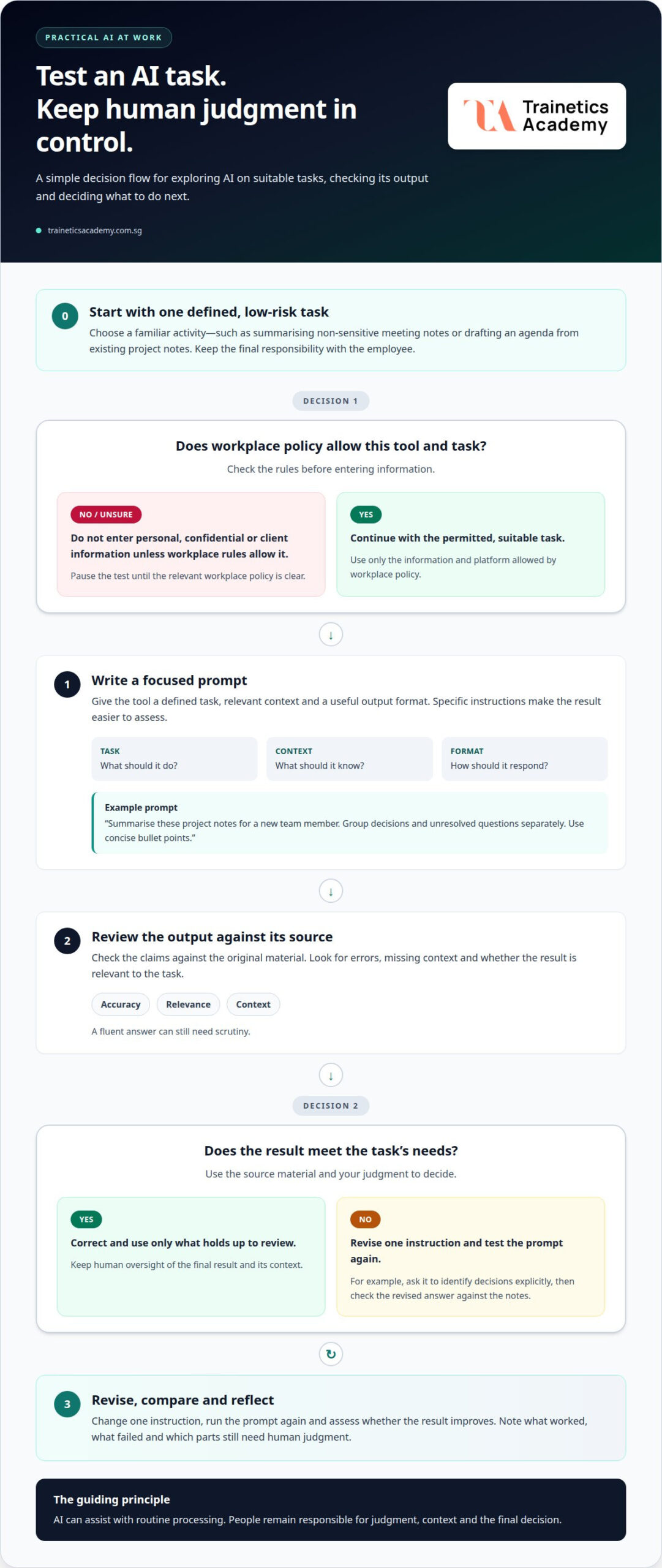
Start with a defined task, such as asking a tool to summarise a non-sensitive document. Give it relevant context, specify the format, then compare the output with the source. If it misses a key point, revise the prompt and assess the new result.
In Singapore workplaces, follow your employer’s AI-use and privacy policies. Don’t enter personal, confidential or client information into a tool unless workplace rules allow it. Learning the basics of large language models, testing prompts and recognising errors can build confidence while keeping accountability with the employee.
Experimenting with prompts and platforms
Confidence grows through practical experiments, not by trying to predict every future use of AI. A short test can show where a tool helps, where it struggles and where your judgment is still needed.
To introduce AI at work without increasing employee anxiety, explain its purpose, invite questions and let employees test suitable tasks in a safe setting. Leaders should discuss concerns openly and clarify how experiments will be reviewed.
Begin with a familiar task and a platform permitted by workplace policy. For example, ask an AI tool to summarise non-sensitive meeting notes, then compare the result with the original. This gives you a clear basis for judging its usefulness instead of relying on guesswork.
A well-formed prompt gives the tool a defined task, relevant context and a useful output format. For example: “Summarise these project notes for a new team member. Group decisions and unresolved questions separately. Use concise bullet points.” Specific instructions make it easier to judge whether the result meets your needs.
Use a simple testing cycle to build skills while keeping the employee in control:
- Choose one task: Select a low-risk activity, such as drafting an agenda from existing project notes.
- Write a focused prompt: State the audience, purpose and format, such as a short agenda for a weekly team meeting.
- Review the output: Compare each claim with the source material and correct errors or missing context.
- Revise and reflect: Change one instruction, run the prompt again and note whether the result improves.
Testing different prompts shows how wording affects an AI response. If a summary overlooks a decision, ask the tool to identify decisions explicitly, then check the revised answer against the notes. Keep useful prompts as examples, but adapt them to each task rather than assuming one version works everywhere.
Leaders can make experimentation more constructive by treating early tests as learning opportunities, not performance tests. Invite employees to share what worked, what failed and which tasks they would prefer to keep human-led. A clear purpose, practical prompt skills and thoughtful review turn exploration into informed use.
turn curiosity into a habit of learning. Leaders can help teams adopt a mindset of possibility and give them permission to experiment with AI in ways that feel safe. Within workplace boundaries, using AI for as many tasks as possible can help workers understand its capabilities; learning large language model fundamentals, exploring platforms and testing prompts can build AI skills and confidence.
Fear of AI-related job loss
Concern about job security can grow when employees hear predictions without context. Distinguish estimates of automation risk from evidence that a specific role or position will disappear. For example, a tool handling one reporting task doesn’t establish what will happen to the employee responsible for the broader work.
Frey and Osborne concluded that 47% of US occupations were at high risk of automation, according to Singapore Government. That figure describes occupations assessed as facing high automation risk; it does not state that 47% of workers lost their jobs. Its US focus also matters when applying the estimate to employees in Singapore.
Managers can address staff concerns by acknowledging them directly, explaining how the organisation intends to use AI and inviting questions. Give concrete examples of tasks under consideration, what remains employee-led and how feedback will shape implementation.
Silence can leave employees to fill gaps with alarming assumptions. A manager who says, “We’re testing AI to draft internal meeting summaries,” gives staff a clearer starting point than a vague promise to modernise. The manager can then explain who reviews the summaries and how employees can flag problems.
Use a structured conversation to understand the sources of concern. Ask whether employees are worried about job security, performance expectations, privacy or being left behind. Each concern calls for a different response: a task demonstration may clarify the technology, while a discussion about changing responsibilities can address uncertainty about roles.
- Name the purpose: Describe the work problem the AI test is intended to address, such as reducing manual sorting of routine requests.
- State the boundaries: Explain which information staff may use and which decisions still require human judgment.
- Invite specific questions: Ask employees what they fear losing, such as a familiar task, professional autonomy or opportunities to develop expertise.
- Report what happens: Share what the trial showed, including errors, limitations and adjustments made in response to staff feedback.
Honest communication should not dismiss uncertainty or promise that work will stay the same. Instead, managers can explain what they know about the current test and which decisions are still under consideration. For example, distinguish a trial of AI-generated first drafts from any decision about team responsibilities.
Employees also need a credible way to influence adoption. Invite those who do the work to identify where a tool could help, where it could create extra checking and what should remain human-led. Their practical knowledge can reveal problems a rollout plan might miss.
For individuals, focus on evidence from your own role. List recurring tasks, note where AI is being tested and ask how expectations might change. This approach turns overcoming fear of AI at work into a clearer assessment of responsibilities, skills and workplace communication.
Human oversight of AI-generated work
AI-generated work needs a human reviewer because tools can make mistakes in polished, confident-sounding language. For example, a draft policy might misstate a process, omit an exception or invent a detail. Treat each output as material to assess, not as a finished decision or authoritative source.
Match the review to the consequences of the task. A brainstorming list may need a quick relevance check, while a customer-facing explanation requires careful review of facts, tone and promises. If AI drafts a response about a delayed order, an employee should confirm the order details and ensure the wording reflects what the business can actually do.
A reliable review can examine four elements:
- Accuracy: Compare names, figures and claims with the original records or trusted source material.
- Completeness: Check whether the response addresses each part of the request, including exceptions.
- Context: Confirm that the wording fits the audience, purpose and workplace situation.
- Accountability: Identify the person responsible for checking and releasing the final work.
Consider an AI-generated spreadsheet formula used to classify service requests. Before applying it to a full dataset, test it against examples with known outcomes, including unusual entries. Check whether blank fields, spelling variations or duplicate records change the result. A small test set can reveal errors before they affect a wider workflow.
Human review also means knowing when not to use an output. If an AI-written performance comment makes an unsupported assumption about an employee, remove it and return to documented observations. If a draft email commits the organisation to an unauthorised deadline, revise it before sending.
Keep a clear boundary between assistance and decision-making. AI can suggest categories for incoming requests, but a staff member should handle ambiguous cases that require interpretation. Reviewers can also record recurring errors, such as missing exceptions, to improve prompts and internal review practices over time.
For team use, define who checks each kind of output and what evidence they need. A content editor might verify quotations against source documents, while a finance employee checks spreadsheet calculations against the underlying figures. Clear ownership prevents an AI-generated draft from moving through a workflow without meaningful scrutiny.
When employees know how to review outputs, AI becomes easier to use responsibly. A practical standard is simple: verify important claims, correct the work and retain human responsibility for the final result. That discipline helps teams benefit from AI without mistaking fluent writing for dependable judgment.
Which workplace tasks are most likely to be automated by AI?
AI is best suited to tasks with repeatable steps, digital inputs and predictable outputs. In an office, that might mean extracting fields from invoices or sorting incoming requests by topic. These are examples of tasks, not whole occupations: a role can combine automatable activities with work requiring experience and judgment.
Look for repeated information handling. An employee who reviews standard forms could use AI to flag missing fields for later review. A team processing routine enquiries might use a tool to suggest categories, while staff handle unusual requests. The practical question is whether the task follows a consistent pattern and whether someone can readily check the result.
- Document processing: Extract dates, names or totals from recurring forms, then compare them with the originals.
- Information routing: Group service requests by topic so staff can direct them to the right team.
- Recurring reporting: Organise a standard report from structured records, then verify its figures and context.
- Transcription and formatting: Turn recorded discussions into draft notes, then correct names and decisions.
Tasks are harder to automate reliably when they involve exceptions or unclear meaning. A request mentioning an unusual delivery arrangement may require a person to interpret the customer’s intent. A report showing a sudden change may require an analyst to investigate its causes, not just describe the pattern.
Consider how much variation a task involves. If staff follow a stable template for routine updates, AI may help prepare a first draft. If each update requires negotiating a different deadline with a client, the human conversation remains central. The same job can include both AI-assisted preparation and people-led decisions.
Separate a task’s suitability for automation from the value of the role. For example, automating the initial organisation of case files doesn’t remove the need for a caseworker to assess evidence, explain options and coordinate next steps. In Singapore teams, mapping a workflow task by task can show where AI may assist and where professional knowledge remains essential.
To assess your own work, list recurring activities and note their inputs, rules and exceptions. Then identify which outputs can be checked against reliable records. A task with clear criteria and accessible source material is easier to review than one involving sensitive judgment or changing circumstances.
Understanding these distinctions can replace broad job-loss fears with a practical view of changing work. To strengthen your understanding of workplace AI, explore an Artificial Intelligence Course.
That distinction reflects the United Nations International Labour Organization’s prediction that generative AI is more likely to augment jobs than destroy them, by automating some tasks rather than taking over entire roles. Human oversight remains important because AI tools can make mistakes. Workers can use AI for simple, time-consuming tasks to make more time for impactful projects, while setting boundaries around what they delegate, such as using a grammar checker while writing their own content. In the COM-B model, motivation can be reflective, involving planning and intentionality, or automatic, involving habits and emotions.
Trainetics Academy: Artificial Intelligence Course
Trainetics Academy offers an Artificial Intelligence Course for people who want to build practical understanding of AI. It can be a natural next step if you’re ready to move from experimenting with tools to developing a more structured understanding of their workplace applications. Learning about AI can help you assess where it may support your tasks and where careful human judgment remains essential.
Use the course as a foundation for informed exploration, not as a substitute for reviewing AI-generated work or following workplace policies. Connect what you learn to tasks relevant to your role, and apply human oversight before using AI outputs. Contact Trainetics Academy to learn more about its Artificial Intelligence Course.
Make Your Next AI Step Deliberate
Progress doesn’t require predicting exactly how work will change. It begins with a deliberate choice: identify a capability you want to strengthen, then connect it to a real responsibility in your role. That might mean learning to evaluate AI outputs, frame clearer requests or decide when a task needs human judgment.
Set a personal standard for using AI. Define what information you can share, what you will review and which decisions remain yours. A clear standard turns experimentation into professional practice instead of another source of uncertainty. As your responsibilities evolve, revisit that standard and build skills that support the work you want to do next.
Overcoming fear of AI at work is an ongoing process of learning, reflection and purposeful action. Trainetics Academy offers an Artificial Intelligence Course for those ready to develop their understanding. Contact Trainetics Academy to discuss AI, and take your next step with confidence.
Frequently Asked Questions
Why are employees afraid of AI at work?
Employees may fear losing job security, control over their work or recognition for their expertise. Unclear plans can intensify those concerns: a staff member may wonder whether a new drafting tool will change performance expectations or reduce development opportunities. Others may worry that AI will make errors for which they’ll be held responsible. Open discussion helps distinguish concerns about the tool from concerns about workplace decisions.
How can workers overcome fear of AI and job displacement?
Overcoming fear of AI at work can start with a concrete conversation about how responsibilities may evolve. Identify a task you want to strengthen, such as explaining recommendations to clients, and discuss how that capability fits your role. Ask your manager which skills the team values as workflows change. A learning plan tied to actual responsibilities gives you clearer direction than trying to master every new tool.
How can employees use AI tools safely and responsibly at work?
Use only tools permitted by your workplace, and follow its information-handling rules. For example, practise with fictional customer details rather than entering a real client record in a prompt. Keep a record of AI assistance when team procedures require it, and make sure a responsible colleague reviews work that affects customers or decisions. These habits help protect information and clarify who is accountable for the final result.
Disclaimer
AI Content Disclaimer: Some articles on this website may be generated or assisted by AI-powered content creation tools. While we strive for accuracy and relevance, readers should independently verify information before relying on it. The content is provided for informational purposes only and does not constitute professional advice.