AI courses can build the knowledge professionals need to assess workplace AI decisions. To avoid common mistakes when implementing AI, learn to examine data readiness, choose meaningful use cases, understand governance, compare tools, and plan for ongoing operational needs.
Studying AI is not just about learning what tools can do. It also means developing the judgment to decide whether a proposed use meets a real business need and how people can use it responsibly.
This guide connects key AI learning themes with practical implementation decisions, from data quality and oversight to tool selection and operating costs. Use these insights to strengthen your understanding and approach workplace AI with greater clarity.
Key Takeaways
- Set clear data-quality criteria and strengthen governance before expanding AI across routine workflows.
- Choose a focused use case that addresses a measurable business need, and define success before starting a pilot.
- Assign responsibility for oversight and verification so important AI outputs receive appropriate human review.
- Match the tool to the task, then test it with a small team and use their feedback to guide broader adoption.
- Plan for ongoing needs such as maintenance, training, monitoring, and data updates, not only initial implementation.
1. Data quality and governance
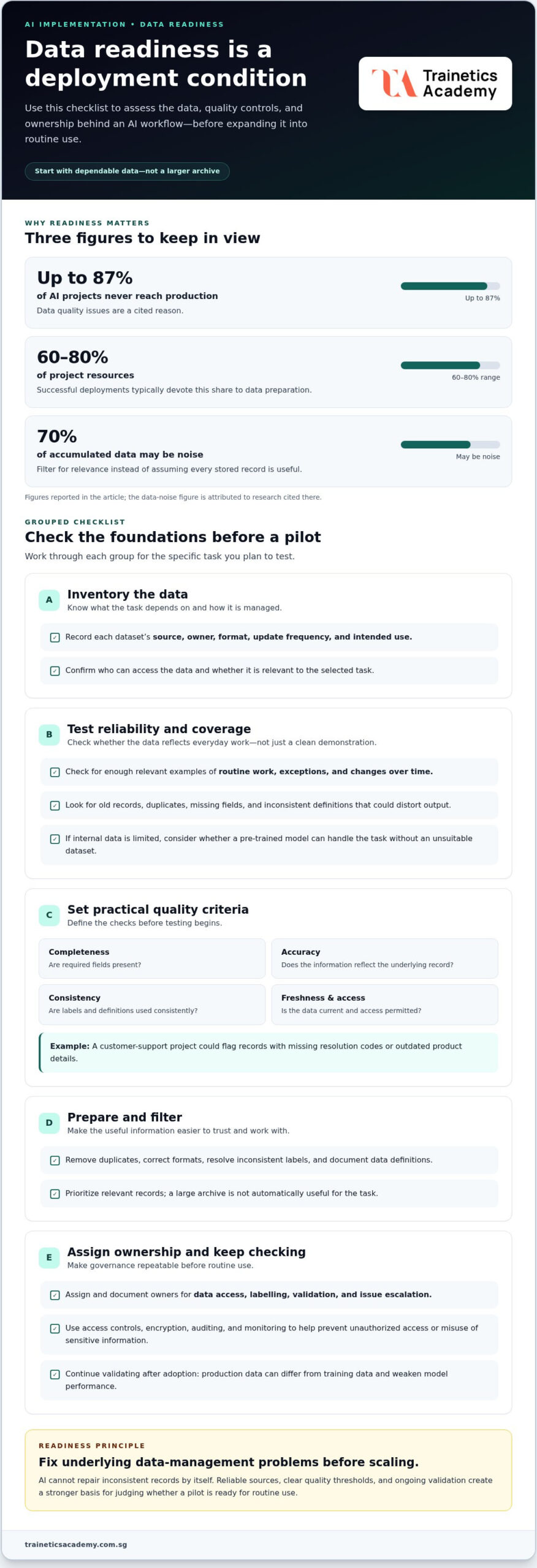
Before introducing AI into an office workflow, identify which data the system needs and who can access it. Poor data quality can produce faulty insights, inaccurate predictions, and weak decisions. Up to 87% of AI projects never reach production because of data quality issues. Treat dependable data as a condition for deployment, not a problem to solve after launch.
For a closer look at why projects fail, watch Why Most AI Projects Fail by Bernard Marr:
Start with a data inventory for the task you have selected. Record each dataset’s source, owner, format, update frequency, and intended use. For example, an AI assistant summarising service requests needs accurate request text and consistent outcome labels. Old records, duplicates, missing fields, or inconsistent definitions can distort its output.
Next, assess data availability and reliability. Check whether you have enough relevant examples to represent routine work, exceptions, and changes over time. A demonstration using clean, prepared inputs may not reflect everyday conditions. If internal data is limited, consider whether a pre-trained model can handle the task without relying on an unsuitable dataset.
Data preparation often takes substantial effort: successful deployments typically devote 60-80% of project resources to it. That work can include removing duplicates, correcting formats, resolving inconsistent labels, and documenting data definitions. The article’s research also reports that 70% of accumulated data may be noise. Filter for relevance instead of assuming that a large archive is automatically useful.
Set practical quality criteria before testing. Define checks for completeness, accuracy, consistency, freshness, and permitted access for each dataset. A customer-support project, for instance, could flag records with missing resolution codes or outdated product details. Continue tracking data quality after adoption: production data can differ from training data and weaken model performance.
Governance makes these checks repeatable. Assign owners for data access, labelling, validation, and issue escalation, then document each role. Use access controls, encryption, auditing, and monitoring to help prevent unauthorized access or misuse of sensitive information. The European Union identifies GDPR as relevant to data governance and AI compliance; organizations should account for applicable obligations in their operating context.
Fix underlying data-management problems before scaling. AI cannot repair inconsistent records by itself. A clear inventory, reliable sources, defined quality thresholds, and ongoing validation give teams a stronger basis for evaluating results and deciding whether a pilot is ready for routine use.
2. Choosing AI use cases based on business outcomes
Begin with a business problem, not a tool demonstration. An AI initiative should support an organizational objective, such as reducing repetitive administrative work, improving response consistency, or helping staff find information faster. Define the problem in operational terms: which team experiences it, where it occurs, and what a better result would look like.
Then compare AI with simpler options. If employees lose time because an approval process has unclear steps, redesigning the process may address the cause more directly than automating it. AI can speed up a confusing workflow without fixing it. Map the current steps, identify the bottleneck, and decide whether AI offers a clear advantage over a standard rule, search function, or process change.
Use a short selection test for each proposed use case. Confirm that it supports a business objective, has relevant data, and can be measured in daily operations. For an office team handling incoming requests, a pilot might classify messages for staff review. Compare routing accuracy, handling time, and unresolved requests with the existing process. These indicators show whether the project addresses the actual problem.
Set the baseline and success criteria before a pilot begins. MIT research found that 95% of enterprise generative AI pilots fail to deliver measurable business value. A defined starting point helps teams distinguish a useful result from an impressive demonstration. Choose operational measures that reflect the objective, assign an owner to each measure, and specify what evidence would justify continuing, changing, or stopping the pilot.
Stakeholder alignment is practical, too. Ask the team doing the work to describe exceptions, quality standards, and risks that management may not see. Involve the process owner, affected employees, and technical decision-makers in defining the pilot. Finance staff, for example, can identify which invoice fields need human review, while operations staff can pinpoint delays. Their input helps set realistic success criteria and support adoption.
Prioritize projects by weighing expected business value against feasibility and risk. A focused task with accessible data, a clear owner, and observable results may be a stronger first project than a broad transformation proposal. For each candidate, record the expected benefit, dependencies, workflow changes, and review responsibilities. This makes trade-offs visible and helps leaders direct resources toward useful AI projects rather than novelty.
Treat the pilot as a decision point, not a promise to scale. Review performance with stakeholders, consider user feedback, and check whether the original objective improved. If the system creates extra review work or misses important cases, revise the scope or choose another approach. This helps organizations avoid common pitfalls and keep AI initiatives accountable to measurable business outcomes.
3. AI governance, responsibilities, and output verification
AI governance turns principles into decisions people can follow. Assign responsibility for policy, approvals, monitoring, and escalation before an initiative enters routine use. For an office assistant that drafts client replies, name who reviews its use, handles errors, and can pause access. Clear ownership prevents operational gaps from becoming persistent problems.
Address AI bias, explainability, and human oversight by assessing fairness throughout development, documenting how outputs are produced, and reviewing consequential decisions. For example, a hiring-support system should not make final candidate decisions without qualified human review.
Create a governance group that includes business and technology stakeholders, and involve legal, compliance, and ethics teams early. Define policies for privacy, acceptable use, risk review, and records of important model decisions. Staff using a writing assistant, for example, should know what information they may enter and whether generated text needs approval before external use. Clear rules make responsible use part of daily practice.
Build fairness checks into the development lifecycle, rather than waiting until after deployment. Compare outputs across relevant user groups and scenarios, then document differences that could affect decisions. A customer-support classifier, for instance, should be tested with varied wording and request types, not just standard examples. Repeat the assessment when the model, data, or workflow changes, and assign someone to investigate flagged patterns.
Explainability should help staff understand what an output can and cannot support. Keep records of model decisions, input sources, versions, and review actions so teams can trace unexpected recommendations. If an AI system prioritises service requests, employees need a clear way to inspect the reasons and correct misclassification. Documentation also supports consistent reviews across departments and helps identify recurring errors.
Define a human checkpoint for verification. Ask reviewers to compare generated material with authoritative internal records before acting, especially when decisions affect customers, business relationships, or operations. AI can produce plausible but false or misleading information, known as hallucinations. A polished answer is not proof of accuracy. Staff, for example, should check a policy summary against the current policy document.
Set escalation steps for errors, bias, or privacy concerns. Automated processes need human supervision, alerts, and timely intervention; otherwise, an undetected error or bias may continue producing defective results. Specify who receives alerts, who can suspend the workflow, and how teams record corrective actions. These controls keep oversight active after launch and give employees a clear response when an output seems unsafe or unreliable.
4. Choosing tools based on task requirements
Test an AI tool with a small team on one defined task before a wider rollout. Compare its outputs with the current process, gather user feedback, and assess accuracy, usability, integration needs, and risks. Set clear success criteria, and stop or revise the pilot if the tool adds work or misses essential requirements.
Choose based on capability, not popularity. Define the task, expected inputs, required outputs, and systems employees already use. For example, a tool that drafts meeting summaries should handle your organization’s meeting formats and produce notes staff can review and edit. A more powerful platform adds little value if a simpler option meets those requirements.
Map the workflow around the task. Identify where information enters, who uses the result, and what happens when the AI tool is uncertain or unavailable. An office team summarising internal documents may need secure access to permitted data sources and a straightforward way to compare summaries with the source material. These details help reveal integration challenges before deployment.
Match training to the tool and the work. Show team members how to give useful instructions, interpret outputs, recognise limitations, and escalate errors. Use realistic examples from their roles, such as drafting a client response or extracting action items from a project update. Without practical guidance, employees may misread generated insights or expect the system to do tasks it cannot handle.
During the pilot, record issues by type: inaccurate output, confusing workflow, access problem, or missing capability. Ask users which steps save effort and which require extra correction. This feedback helps distinguish a tool limitation from a training or process gap. Review the findings with the pilot team before adjusting settings, changing the task, or expanding access.
For machine-learning systems used in production, plan operational controls early. MLOps practices can support model versioning, experiment tracking, automated testing, and monitoring. Tools such as MLflow, DVC, and Kubeflow are used to manage parts of these workflows. Choose practices suited to your team’s technical capacity and system complexity: adopting a platform without owners or processes can create extra overhead.
Define ownership before launch: name who monitors performance, manages versions, reviews incidents, and approves changes. Document expected behaviour and test it after updates, since changes to a model or data pipeline can affect outputs. A task-focused selection process, hands-on training, and operational discipline help an organization choose an AI tool it can use responsibly and maintain over time.
5. AI implementation and operating costs
Budget for the full operating cycle, not just initial setup. An artificial intelligence project can require infrastructure, data preparation, integration, employee training, monitoring, maintenance, and retraining. For example, an office assistant may need staff to review outputs and update reference materials as internal processes change. Include these recurring tasks in the business case before launch.
Separate implementation expenses from operating expenses. Implementation may involve configuring a tool, connecting approved data sources, and testing workflows. Ongoing operations can include computing, user support, quality checks, incident response, and model updates. This helps leaders compare the complete cost with the expected business benefit, instead of judging a project by its initial setup alone.
Plan for changing workloads. Global data-centre electricity demand is projected to reach 1,050 TWh by 2030 due to AI workloads. This global figure does not determine a Singapore organization’s bill, but it highlights why computing consumption belongs in operational planning. Track usage by task and user group, then review whether each workload continues to justify its resource use.
Build a funding and review process into AI governance. Assign budget owners, set approval criteria, and schedule reviews that consider performance, risk, and business priority. A Boston Consulting Group study found that 60% of respondents reported minimal or no material returns from AI investments. That finding reinforces the need to connect spending decisions with measured results and operational evidence.
Include the cost of keeping systems reliable. Production deployment may require monitoring, retraining pipelines, infrastructure, and incident response. Data drift can reduce model performance over time, so plan how to detect changes and refresh models. For an AI tool that supports document processing, include time to check output quality when source templates or business processes change.
Account for people and process costs, too. Employees need time to learn safe, effective use; managers need capacity to review outcomes; and technical teams need clear maintenance ownership. If automation shifts work rather than removing it, measure the additional review effort. Compare that effort with the task’s original workload to judge whether operations have improved.
Use a pilot budget with explicit decision points. Track implementation effort, ongoing resource use, support needs, and selected business measures. Review them before extending the pilot to more teams. If costs rise while the intended operational benefit remains unclear, adjust the scope or stop the expansion. This disciplined approach keeps AI spending tied to useful processes.
Build practical AI knowledge before teams make deployment and budget decisions. Explore how an Artificial Intelligence Course can help develop stronger understanding of AI capabilities and implementation considerations.
Trainetics Academy: Artificial Intelligence Course
Trainetics Academy offers an Artificial Intelligence Course for professionals who want to build practical understanding of AI. For anyone considering AI training in Singapore, learning can help develop the knowledge to assess workplace applications and take part in informed discussions.
If you are comparing AI courses for beginners or a short AI course in Singapore, consider how the course content fits your experience and goals. If exploring SkillsFuture options, check course-specific funding eligibility alongside your learning needs.
To learn more about the Artificial Intelligence Course, contact Trainetics Academy.
Build AI capability before your next decision
The next step is to make sound AI judgment part of everyday work. Teams need people who can distinguish a useful application from an appealing demonstration, ask sharper questions about risk, and explain why a proposed tool fits its purpose. That capability helps turn AI planning into considered organizational practice, rather than a series of disconnected experiments.
Learning can support that progress. Trainetics Academy offers an Artificial Intelligence Course for people who want to build their understanding of AI and contribute more confidently to workplace discussions. Strengthening your knowledge can help you avoid common mistakes when implementing AI by making evaluation and prioritisation more deliberate.
Take the next step in developing your AI knowledge. Contact Trainetics Academy today to learn about its Artificial Intelligence Course.
Frequently Asked Questions
What are common pitfalls to avoid during AI deployment?
To avoid common mistakes when implementing AI, plan for failure handling as carefully as normal operation. Decide what employees should do when a system returns an incomplete answer, cannot process a file, or produces conflicting results. For example, an office assistant should send uncertain requests to a designated staff queue rather than silently presenting a guess. A clear fallback keeps routine disruptions manageable.
What are the most common mistakes when implementing AI in a business?
Common mistakes include adopting AI without a defined business need, assuming its output is always correct, and overlooking how work changes after deployment. A team might automate appointment summaries but fail to assign someone to correct missing dates or names. Another mistake is assuming employees will use the tool correctly without guidance. Set ownership, workflow expectations, and review practices before making it part of daily work.
How should businesses define goals and success metrics for AI projects?
Define success by work outcomes, not by how often employees use a tool. For an AI assistant that drafts internal updates, compare editing effort and factual corrections with the existing approach. Pair a productivity measure with a quality measure, so faster output does not hide additional errors. Record how you measure the baseline and who reviews results before expanding the project.
How can organizations assess data quality and availability before implementing AI?
Test a representative sample of records under the task’s real conditions. Include unusual cases, different document formats, and records from relevant business units, rather than selecting only clean examples. Check that your organization has permission to use each source for its intended purpose. A sample review can expose gaps, such as inconsistent product names, that a large data archive might otherwise hide.
How do you choose between custom AI, off-the-shelf tools, and generative AI?
Choose an off-the-shelf tool when its existing functions fit a standard task, such as sorting routine requests. Consider custom AI when the workflow depends on specialised rules or data that general tools cannot handle well. Generative AI can suit language or content tasks, such as drafting a first version of a briefing. Compare integration effort, control needs, and staff review requirements before selecting a tool.
What are the main AI security, privacy, and data protection risks?
Key risks include exposing sensitive information through prompts, granting a tool broader access than its task needs, and retaining data longer than intended. Staff might, for example, paste confidential customer details into a system without understanding how that information is handled. Classify information, restrict access by role, and test safeguards with realistic scenarios. Give employees clear instructions on what data they may enter.
How can organizations prepare employees and manage change during AI adoption?
Involve affected employees before changing their workflow, and explain what the system will handle and what remains their responsibility. Use role-specific practice: an administrator could learn to review generated meeting notes, while a manager practises checking action items before assigning work. Provide a channel for reporting friction or errors. Addressing concerns openly helps teams adapt with a clearer understanding of the change.
What should businesses monitor and maintain after deploying AI?
Monitor output quality, user corrections, system changes, and incidents that interrupt the workflow. Keep records of model versions and significant updates so teams can trace when performance changes. For an assistant that searches internal policies, review results whenever source documents or policy language changes. Assign an owner to investigate recurring errors, update tests, and decide when retraining or a workflow adjustment is needed.
Disclaimer
AI Content Disclaimer: Some articles on this website may be generated or assisted by AI-powered content creation tools. While we strive for accuracy and relevance, readers should independently verify information before relying on it. The content is provided for informational purposes only and does not constitute professional advice.