Start with a workflow, not an AI tool. AI workflow automation uses machine learning to recognise patterns and interpret information, while rule-based automation follows fixed if-then instructions. A practical plan for implementing AI in my company workflow begins with a predictable, high-volume task and measures whether the change improves the work.
It makes sense to want clear, reliable results before introducing AI into everyday operations. The best starting point is not necessarily the most complex process. Look for a task with repeatable steps, useful data and an outcome your team can assess. Keep core business rules clear, and use human review when an AI output could significantly affect a customer or employee.
This guide explains how AI automation differs from traditional automation, where it can support business operations and how to introduce it in a controlled way. It also covers what to monitor, including task accuracy, completion rates, time saved, user feedback and how often employees need to correct outputs. The aim is to help you start thoughtfully, learn from real results and build your team’s capability as the workflow evolves.
Key Takeaways
- Choose a predictable, high-volume workflow with clear business value before selecting an AI tool.
- Assess data quality, access controls and governance so the workflow can handle information responsibly.
- Use AI for tasks that involve interpreting varied inputs, while keeping core business rules deterministic.
- Set measurable outcomes, then monitor accuracy, completion rates, time saved and human overrides.
- Build practical AI knowledge through Trainetics Academy’s Artificial Intelligence Course when your team needs a stronger foundation.
What is AI workflow automation?
AI workflow automation applies machine-learning models to business tasks that involve recognising patterns, interpreting information or adapting to varied inputs. For example, a fixed rule might send every invoice above a set amount for approval. An AI model can extract invoice details and compare them with purchase-order information. Its output supports the workflow, while employees remain responsible for decisions that require judgement.
To identify suitable workflows, list recurring tasks and compare their volume, decision complexity, data quality and consequences of error. Sorting customer enquiries may suit AI when messages arrive in different formats but fit recognisable categories. Start with a predictable task where employees can review outputs and correct mistakes easily.
Large language models can turn unstructured text, images and audio into structured data. For example, a model could classify a written service request by topic, urgency and relevant account details, giving a support team fields to route or review. Define the required output before testing. A short label or category is easier to assess than a broad, open-ended response.
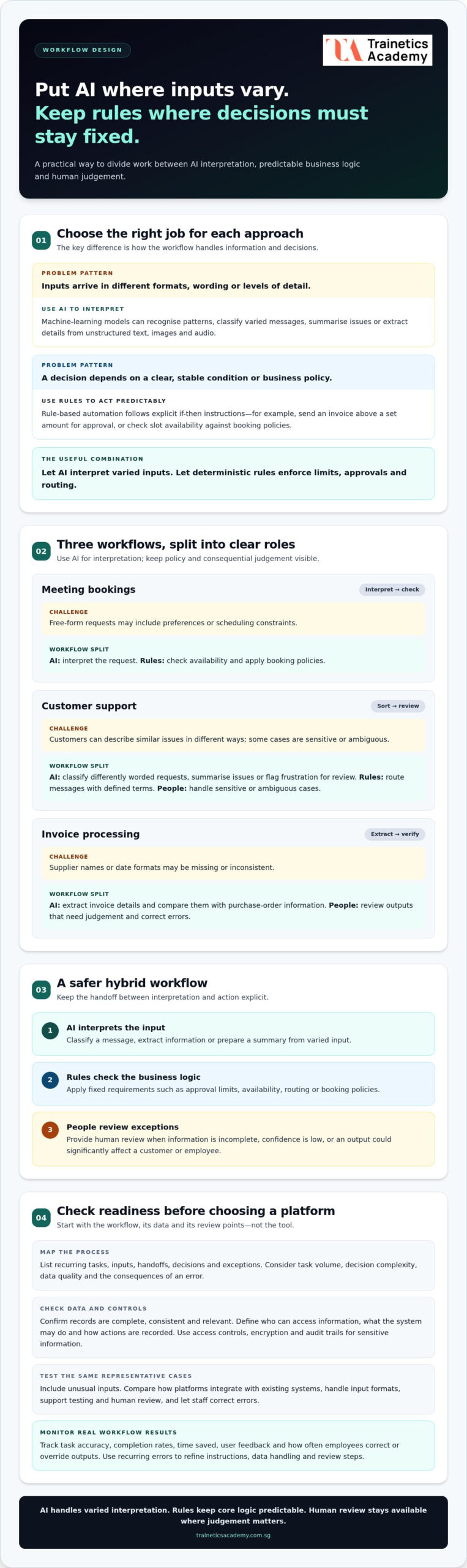
Assess readiness by mapping each workflow’s inputs, handoffs, decisions and exceptions. Then check whether records are complete, consistent and relevant to the task. In an invoice workflow, missing supplier names or inconsistent date formats can weaken data extraction and matching. Identify who owns each dataset, how it is updated and which employees understand the process before deciding where models fit.
Data governance should define who can access information, what the system may do with it and how its actions are recorded. For sensitive information, use access controls, encryption and audit trails. Before processing personal data, map the applicable privacy and regulatory obligations in Singapore and limit information to what the workflow needs. Test for biased or uneven outputs across relevant cases.
AI can analyse incoming data as it arrives, helping teams prioritise decisions without manually reviewing every record first. For example, an enquiry-classification workflow can flag a message about an account issue for prompt review. Keep a human review step when an output could materially affect a customer or employee. Staff should be able to correct classifications and record why they overrode a result.
Train employees on how the workflow works, where its limits are and when to escalate an uncertain result. Use realistic examples, such as a poorly scanned invoice or an enquiry that fits two categories, so staff can practise reviewing outputs. Ask process owners to report recurring errors, then refine instructions, data handling and review steps. Build change into the workflow’s design rather than treating it as an afterthought.
AI workflow automation compared with rule-based automation
Rule-based automation follows explicit instructions: when a condition is met, the system performs a specified action. AI automation uses artificial intelligence models to interpret varied inputs, recognise patterns and produce a useful result. A business can combine both, using AI for interpretation and fixed rules for approvals, limits and routing.
Consider meeting bookings. A rule-based workflow can send a confirmation when someone selects an available slot, but it may struggle with free-form requests that include preferences or scheduling constraints. A machine-learning model can interpret those messages, while deterministic rules check availability and apply booking policies. This division keeps core business logic predictable.
Customer support illustrates the difference. Rules can route messages containing defined terms, such as “refund,” to a billing queue. AI can classify differently worded requests, summarise the issue and flag a frustrated customer for review using sentiment analysis. The support team still handles sensitive or ambiguous cases, while automation reduces repetitive sorting.
When comparing AI workflow automation platforms, assess whether each integrates with your existing systems, handles your input formats and supports testing, access controls, audit trails and human review. Test each platform on the same representative cases, including unusual inputs. Then consider how easily staff can correct errors and track workflow results.
AI can also support recruitment and finance processes. For example, it can screen resumes against stated job requirements or extract invoice details for comparison with purchase orders. These outputs need defined criteria and review points. A screening model should help organise applications, not replace a considered hiring decision.
Task chaining connects several actions into one business process. A support workflow might classify a message, draft a response and create a case for an employee. Each stage depends on the previous output, so a poor classification can send the case down the wrong path. Keep decision rules visible and provide a fallback when confidence is low or information is incomplete.
Implementation costs depend on workflow complexity, data preparation, integrations, model use, employee training and ongoing monitoring. A contained process using clean data and existing systems has different cost drivers from one that requires substantial integration or human review.
Use rule-based automation when decisions are stable and need to remain transparent. Apply AI when inputs vary and interpretation adds value. In recruitment, for instance, fixed rules can enforce required application fields, while AI can organise free-text experience for employee review. This hybrid approach uses AI where it helps without making every business decision unpredictable.
What are the Different Types of AI for Business Operations?
Business operations can use different AI capabilities for different decisions. Machine-learning models detect patterns in historical data, while language models interpret text and generate summaries. Computer vision analyses images, and forecasting models estimate future demand. Choose the capability that addresses a defined business objective instead of adding AI without a clear operational purpose.
Start by stating the business goal and the outcome that would show progress. For a stock-planning workflow, the goal might be to reduce avoidable stockouts. Relevant measures could include forecast accuracy, stock availability and employee time spent adjusting orders. Record the current process first. A baseline lets organizations compare later results with existing performance rather than relying on impressions.
Common operational applications include:
- Prediction: Forecast product demand from historical sales and seasonal patterns.
- Language processing: Summarise policy documents or extract key details from written feedback.
- Computer vision: Identify visible defects in product images for staff review.
- Optimisation: Recommend schedules or resource allocations against defined constraints.
Each capability supports different actions. A forecasting model can recommend an order quantity, while deterministic rules enforce supplier limits, approval thresholds and inventory policies. Keeping core business logic fixed makes decisions easier to explain and audit. Let the model inform a choice, and use explicit rules to determine which actions it may take.
Define measurable outcomes alongside safeguards. A logistics team might track delivery-plan accuracy and the number of manual adjustments, while checking whether recommendations meet operating constraints. Assign an owner to each measure, set how often results will be reviewed and decide what triggers human review. This connects AI performance to operational results, not just model activity.
AI can also support sustainability work by identifying patterns in energy use, materials or transport. Deloitte research found that 81% of executives are using AI to advance sustainability goals. For a facilities team, an analysis of energy-consumption records could highlight periods for investigation. Staff still need to assess whether a recommended change fits operational requirements.
To measure return on investment, compare the workflow’s baseline with its results using relevant measures such as time saved, error reduction, completion rates and user satisfaction. Include implementation and operating costs when evaluating financial value, and check whether improved performance lasts as employees use the workflow.
Monitoring and improving AI performance
Set clear performance measures before an AI workflow goes into production. Track both the model’s outputs and the business process they support.
Tracking AI Performance
AI performance monitoring means regularly comparing a workflow’s outputs and operational results with defined measures. For a customer-support classifier, review whether messages reach the right queue, how often employees correct its labels and whether urgent cases receive timely attention. These measures show whether the system supports productivity or creates extra work. Record errors by type, such as misclassification, incomplete summaries or delayed processing, so teams can identify patterns instead of reacting to isolated incidents.
Optimizing AI Workflows
Workflow optimisation uses monitoring results to improve prompts, data inputs, review steps or task boundaries. If an invoice model repeatedly misses supplier names in scanned documents, separate document-quality problems from extraction errors before changing the process. Test revised prompts against representative examples and compare the results with the previous version. Keep AI tasks narrow: clear tasks make output quality easier to assess and corrections easier to target.
Use a consistent dashboard for the enterprise workflow, then review a balanced set of measures: processing time, task completion, error rates, user satisfaction and manual overrides. A faster process may still perform poorly if employees repeatedly correct its outputs. Compare results with the workflow’s starting baseline and check whether improvements hold across different input types, departments and operating conditions.
Prompts and models need regular testing as business language, documents and processes change. Keep examples of correct and incorrect outputs, including unusual cases such as an incomplete support request or an invoice with an unclear line item. Re-test updates against these examples before release. If accuracy falls, pause or narrow the affected task while the team investigates the cause.
Monitoring also covers the technology that keeps an AI workflow running. An IT monitoring system can detect performance anomalies, create tickets for potential issues and run remediation scripts for common problems. For example, a sudden rise in failed data transfers could interrupt invoice processing. A clear incident process should identify the affected workflow, assign an owner and preserve records for review.
Assign responsibility at every stage. Business owners assess whether outcomes remain useful, while technical teams investigate system faults and model behaviour. Employees who use the workflow can report recurring errors and explain where a handoff fails. Include these observations in the next review, then document the change and its measured effect. This creates a disciplined improvement process rather than a series of untracked adjustments.
When a workflow’s results drift, examine its inputs, instructions, system connections and review decisions before expanding its role. A new document template, for instance, may affect extraction quality even when the model has not changed. Monitoring the complete process helps teams find the cause, protect service continuity and make evidence-based improvements.
Steps for implementing AI workflows
Effective implementation starts with process design, not model selection. Use this sequence to test an AI workflow against real business needs before expanding it.
- Choose a contained process. Select a predictable, high-volume task with low implementation risk, such as sorting routine enquiries. Define the business outcome and the current process before changing either. A narrow starting point makes it easier to identify where AI adds value and where fixed rules remain more suitable.
- Map the full workflow. Document each input, handoff, decision, exception and final action. For an invoice process, trace how a document arrives, how details are extracted, who checks the information and how approval is recorded. This reveals delays and duplicated work. Untangle flawed steps first, because AI can carry errors through connected tasks.
- Set boundaries and measures. Specify which decisions the model may support, what output it must produce and when an employee takes over. Choose measures tied to the process, such as completion rates, error corrections or time spent on manual handling. A business leader implementing AI in their company workflow should keep essential approval thresholds and business policies deterministic, preserving predictable, auditable decisions.
- Involve the people who operate it. Bring employees and department leaders into design early. Ask them to identify exceptions, confusing records and actions that need judgement. For example, support staff can explain why two similar-looking customer messages require different responses. Their practical knowledge helps shape useful instructions, review points and escalation paths.
- Test before deployment. Run the model against representative examples, including incomplete or unusual inputs. Evaluate its instructions on 10-20 samples before deployment, checking whether the output follows the required format and handles exceptions appropriately. Record each failure and refine the task, instructions or data before connecting the model to consequential actions.
- Pilot, then expand deliberately. A four-week pilot with five real users can reveal issues before an enterprise rollout. Track how often users accept, edit or override the output, and collect examples of errors. Use those findings to adjust the workflow and training. Expand only after the process works reliably for the people who will operate it.
Look beyond isolated tasks. Redesigning a complete workflow can create more value than adding AI to one step without improving the handoffs around it. Still, integrate gradually: connect each new action to a clear owner, an appropriate review point and a fallback for failures. This helps teams understand how outputs affect the next stage.
For practical guidance on applying AI concepts to business workflows, build your AI knowledge through structured learning.
Trainetics Academy: Artificial Intelligence Course
Trainetics Academy offers an Artificial Intelligence Course for individuals and organisations interested in AI education. If you’re considering further study after exploring how AI may fit into business workflows, you can learn more about the Artificial Intelligence Course. Contact Trainetics Academy to discuss the course, or visit traineticsacademy.com.sg for more information.
Build the Capability to Move Forward
Turn your workflow idea into a shared business decision. Bring process owners, employees and technical stakeholders together around a clear purpose: what should improve, who will use the AI-supported process and who remains accountable for its decisions? This alignment helps teams treat AI adoption as an operational change, not simply a software choice.
For leaders considering implementing AI in my company workflow, building AI capability can help turn concepts into informed action. Trainetics Academy offers an Artificial Intelligence Course for people developing their understanding of AI and its workplace applications. Use that learning to strengthen internal discussions, assess opportunities more clearly and support employees as processes evolve.
Take the next step at a pace that fits your organisation. Contact Trainetics Academy to explore the Artificial Intelligence Course, and keep building the knowledge to lead change with confidence.
Frequently Asked Questions
How Can I Determine If My Business Is Ready For AI?
Your business is better prepared when a process has a clear owner, a stable purpose and records that staff can access and interpret. Check whether employees agree on what a successful result looks like and who handles exceptions. If different teams classify the same enquiry differently, for example, establish shared categories first. Readiness also means having a fallback for inaccurate outputs or system interruptions.
What is AI integration?
AI integration connects an AI model with the information and systems a business uses, so its output can support an operational process. For example, a model might summarise a supplier message and add the summary to a purchasing team’s existing case record. Integration involves more than selecting a model: teams need to define what information flows in, where results go and who can act on them, often collaborating with digital solutions agencies like Starlet Technologies to align software systems and IT infrastructure.
What’s the difference between AI automation and AI integration?
AI automation uses AI to perform or assist with a task, while AI integration connects AI capabilities to business systems and workflows. A model that drafts a product description demonstrates AI use; sending that draft into a content review system demonstrates integration. A connected workflow may still require employees to approve each output, so integration does not automatically mean the process is fully automated.
What are the steps to implement AI in a company workflow
Begin by selecting a process owner and documenting the intended result. Define what information the AI may use, what its output should contain and which actions require employee approval. Prepare representative test cases, including exceptions, and compare the results with the team’s acceptance criteria. Before wider use, assign responsibility for handling failures and decide how staff can pause or reverse the workflow.
What data and systems are needed to integrate AI into company workflows
Start with the information the task requires, such as product descriptions, service requests or authorised internal guidance. Identify its source, owner, format and destination before connecting systems. The workflow also needs a way to send inputs to the model and return outputs to the relevant business record or employee. Clear permissions, reliable identifiers and a record of changes help teams trace how information moves.
What are the risks of using AI in business workflows and how to mitigate them
AI workflows can produce inaccurate outputs, expose information to unintended users or treat similar cases inconsistently. Reduce these risks by limiting access to necessary data, testing varied examples and requiring employee review for consequential decisions. Keep a way to stop or redirect the process if outputs become unreliable. In Singapore, businesses should consider their data protection responsibilities when designing workflows that handle personal information.
What AI tools and platforms are best for business workflow automation
How much does it cost to implement AI in a business workflow
Implementation costs depend on workflow complexity, data preparation, integrations, model use, employee training and ongoing monitoring. A contained process using clean data and existing systems has different cost drivers from one that requires substantial integration or human review.
Disclaimer
AI Content Disclaimer: Some articles on this website may be generated or assisted by AI-powered content creation tools. While we strive for accuracy and relevance, readers should independently verify information before relying on it. The content is provided for informational purposes only and does not constitute professional advice.